Pi KYC Migration Pending Problems and Solutions [A-Z Guide]
Tired of Pi Network KYC migration problems, or still stuck on “Pending,” “Tentative Approval,” “Review in Progress,” or “Processing”?
You are not alone. Many Pi users keep asking why their KYC shows verified, yet the Pi app still says “Wait for KYC Results.”
Thousands of users across Reddit, X (Twitter), Telegram groups, YouTube comments, and community forums have reported the same issue for months — and in some cases, years.
One thing is clear: Pi KYC approval can sometimes happen quickly, but migration may still take weeks, months, or even years.
Whether you are a new Pioneer who just joined Pi yesterday or an OG miner who has been around since the early days, the system processes accounts differently.
Your KYC can suddenly get picked from anywhere in the system, verified automatically, and then placed quietly into the migration queue for the Open Mainnet.
Sometimes, validators approve accounts manually. Other times, the system verifies users automatically after learning from previous validations. The same situation can happen again during migration, especially on Step 9.
What Pi KYC Pending Actually Means
Pi KYC pending does not always mean rejection.
According to Pi Network Official Support, many accounts under “Tentative Approval” simply require additional automated checks before full approval.
Let’s look at the common reasons.
11 Reasons Why Your Pi KYC Is Pending
- Identity verification issues
- Name mismatch with your Pi profile
- Previous policy violations on the account
- Blurry or unclear ID images
- AI flagged the application for manual review
- Poor selfie or facial verification quality
- Your application is still in the validation queue
- Your document does not match your selected country
- Mainnet checklist synchronization issues
- Server sync problems between Pi Browser and Pi App
- Lack of validators in your region.
What Tentative Approval Means
Tentative Approval became one of the biggest Pi KYC issues in 2025–2026.
If your status says:
- Tentative Approval
- Processed
- Validating.
…it usually means your KYC has already passed initial verification, but the system still wants additional confirmation from validators in your region or nationality group.
In simple terms, Pi’s AI needs more confidence before granting full approval.
4 Ways to Resolve Tentative Approval Successfully
Fix #1: Keep Mining Daily
Many community validators report that inactive accounts remain in tentative status longer.
Spend a few minutes daily starting your mining session to maintain activity.
Fix #2: Complete New Liveness Checks Quickly
If Pi requests another liveness check:
- Use good lighting.
- Remove glasses.
- Keep a neutral expression.
- Avoid blurry cameras.
Fix #3: Avoid VPNs
Using VPNs can sometimes trigger extra security reviews.
To reduce delays:
- Disable VPNs.
- Turn off ad blockers.
- Avoid Private DNS tools during verification.
Fix #4: Wait for System Reprocessing
Some accounts are automatically upgraded during major migration waves after new AI checks are introduced.
Pi Status Changed from Passed Back to Tentative Approval
If your KYC previously showed “Passed” and later changed back to “Tentative Approval,” it usually means:
- Your KYC was approved initially.
- Additional regional validations are now required.
- The network is still preparing your migration to Mainnet.
This can happen during both first-time migration and Step 9 migration reviews.
The 5 Most Common Pi KYC Problems
1. KYC Stuck on Pending Forever
This is one of the most common complaints in the Pi community.
Typical symptoms include:
- “Review in Progress” for months
- No rejection notice
- No resubmit option
- Mainnet checklist not updating
Possible Causes
- AI uncertainty
- Facial verification problems
- Queue overload
- Validator mismatch
- Suspicious activity detection.
Fix #1: Log Out and Log Back In
Clear app cache, restart your device, and sign in again to force synchronization.
Fix #2: Update Both Pi Apps
Update the Pi Network App and the Pi Browser because older versions often fail synchronization.
Fix #3: Avoid Reinstalling Immediately
- Reinstalling too quickly may reset session data and delay syncing further.
- Try clearing the cache first.
Fix #4: Wait for Migration Waves
- Pi periodically processes accounts in large batches.
- Many users under Tentative Approval later receive automatic approval after system-wide AI updates.
2. KYC Approved in Pi Browser but Pending in Pi App
Sometimes the Pi Browser shows approval while the Pi App still shows pending status. Usually, this is just a synchronization delay.
Fix #1: Force Sync
- Open Pi Browser
- Visit
kyc.pi - Open the Pi App immediately afterward
- Recheck the Mainnet checklist.
Fix #2: Start a New Mining Session
Some users report checklist updates within 24–72 hours after starting a new mining session.
Fix #3: Clear Pi Browser Cache
- Android: Settings → Apps → Pi Browser → Storage → Clear Cache
- iPhone: Offload App → Reinstall from App Store.
Fix #4: Wait for Server Refresh
Some synchronization problems resolve automatically after several days.
3. No KYC Slot Available
This usually affects:
- New accounts
- Flagged accounts
- Suspicious mining patterns.
Solutions
- Complete at least 30 mining sessions
- Avoid policy violations
- Stay active daily.
4. KYC Rejected Due to Name Mismatch
This is extremely common.
Causes
- Missing middle names
- Nicknames in Pi profile
- Typos during registration
- Different spelling formats.
Fix
Your Pi account name should match your government ID exactly — including spacing and punctuation.
If an appeal option appears, submit corrections immediately with clearer ID images.
5. Liveness Detection Failed
Pi’s AI may struggle with:
- Poor lighting
- Low-quality cameras
- Shadows
- Motion blur
- Heavy beauty filters.
Solutions
- Use natural daylight
- Clean your camera lens
- Avoid filters and portrait effects
- Keep your face steady during scanning.
7 Ways to Solve Pi Network KYC Migration Pending Problems
1. Re-validate Your Pi Account Profile
One of the most effective methods is re-validating your account details by updating:
- Password
- Phone number
You do not necessarily need a new email or phone number. Simply updating your password can trigger account synchronization.
Many users report that their KYC issues were resolved within days after doing this.
How to Change Your Pi Password
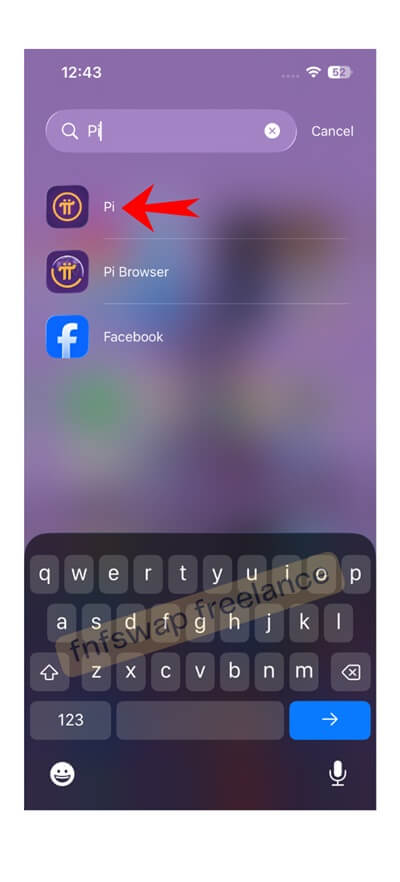
Step 1: Open the Pi App
Go to your Pi account profile. Not the Pi wallet app, but the app.
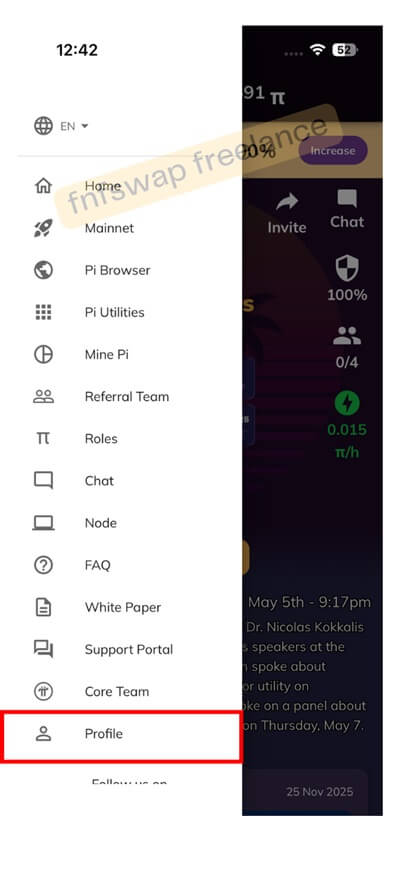
Step 2: Open Profile Settings
Tap the profile section at the bottom-left corner.
Step 3: Update Password
Scroll down and select Update Password.
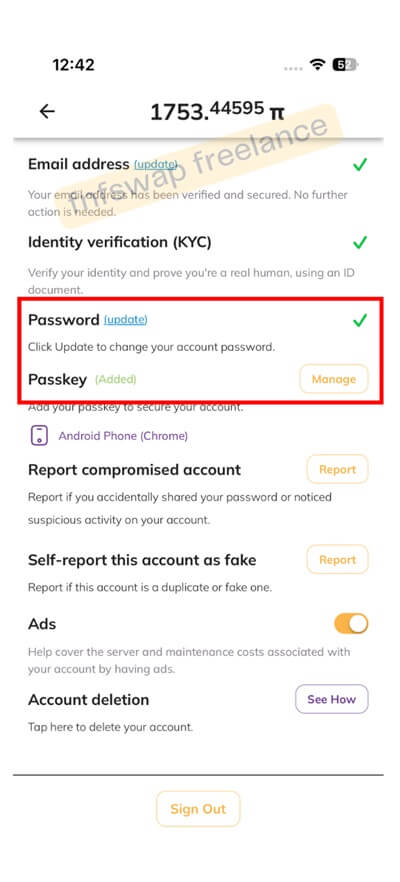
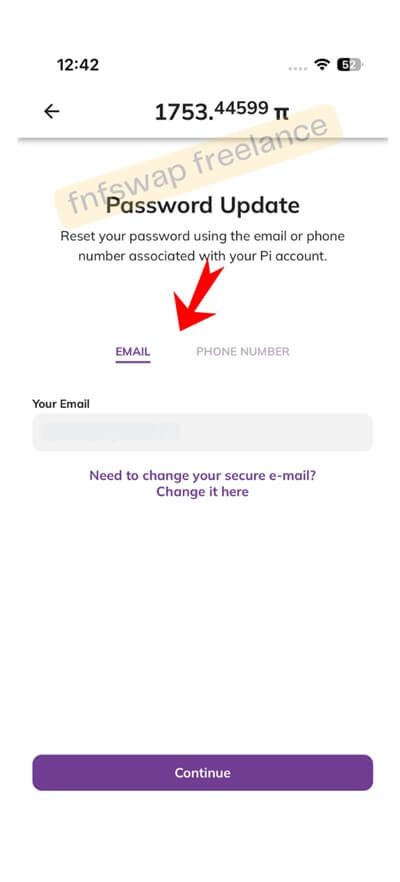
Step 4: Verify Using Email or Phone Number
You can reset using:
- Phone number linked to your account.
After completing this process, wait about 7 working days.
2. Redo the Liveness Check
If your account moved into Tentative Approval after profile updates, complete any new liveness prompts immediately.
3. Encourage Your Security Circle to Complete KYC
Some users report faster migration progress after more security circle members complete KYC successfully.
4. Become a Validator
Some users claim that becoming a validator helped their own migration process move forward.
After validating around 30–50 accounts, some users reported changes from:
- Tentative Approval → Approved.
- Approved → Migrated to Mainnet.
How to Become a Validator
Open your KYC page and look for the Become a Validator option.
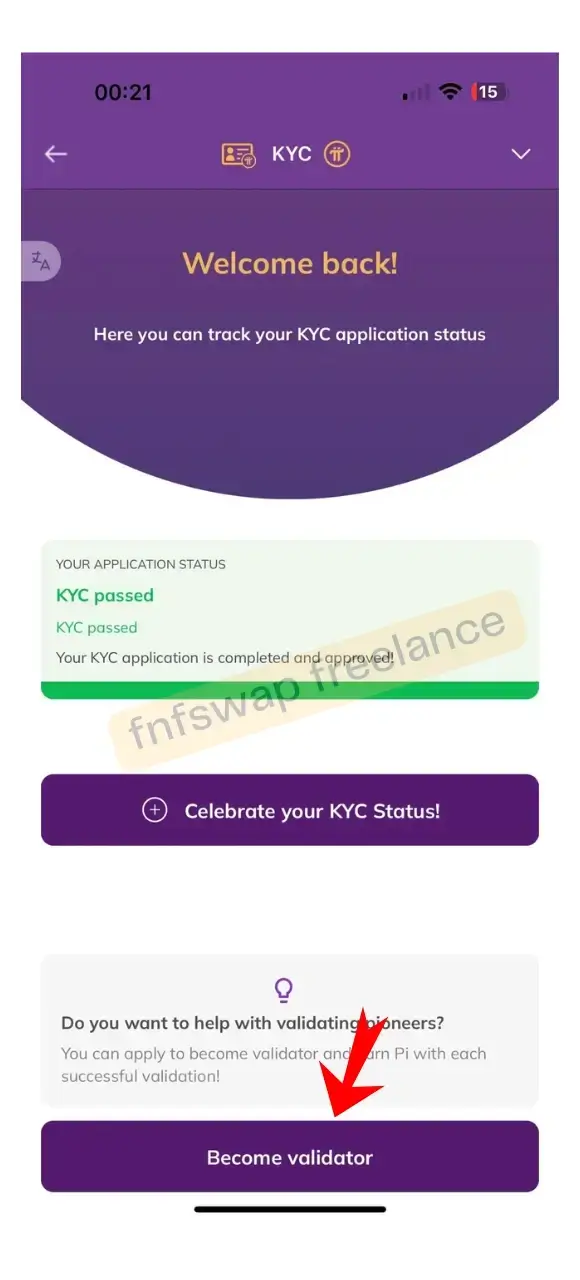
Complete validations carefully and accurately.
5. Contact the Pi Team
Some users say contacting support helped speed up their review process.
Use the official support portal: Pi Network Support Portal
Navigate to:
- Customer Portal
- KYC Support
- Email Request.
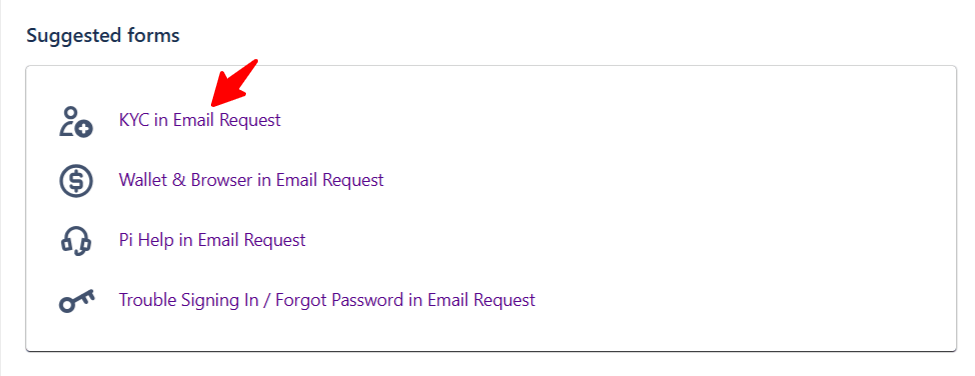
Submit your issue clearly and wait for a response.
6. Wait for Automatic Approval
Sometimes there is nothing wrong with your account.
If you have already tried every recommended solution, the best option may simply be patience while the system processes new migration batches.
7. Avoid Fake Pi Validators and Scammers
Never trust people offering:
- Fast KYC approval
- Paid migration unlocks
- Wallet recovery services
- Passphrase assistance
If you share your wallet passphrase, you risk losing your Pi permanently.
Mainnet Checklist Stuck — Causes and Solutions
If your KYC is already approved, but you are stuck on:
- Step 8
- Step 9
- Migration Queue…the issue may be related to:
- Migration backlog
- Wallet synchronization problems
- Email verification issues
- 2FA confirmation bugs.
Solution: Reconfirm Your Wallet
Some users fix migration problems by:
- Creating a new wallet
- Reconfirming wallet ownership
- Reattempting migration.
Best Pi KYC Validation Action Plan
If your Pi KYC is pending right now, follow this order:
- Update Pi App and Pi Browser
- Clear app cache
- Log out and log back in
- Visit
kyc.pi - Start a new mining session
- Disable VPNs and ad blockers
- Complete liveness checks immediately
- Wait 7–14 days
- Monitor Mainnet checklist synchronization
- Avoid reinstalling repeatedly
- Be patient, and don’t bend to rushing.