how to send money from skrill to skrill

Skrill to Skrill Transfer: Fees, Limits, Errors, and How Long It Takes

If you’ve used Skrill in Nigeria for any length of time in receiving payments from a forex broker, a betting platform, or a client abroad, you’ve almost certainly come across the term or seen it on your Skrill account dashboard: “Skrill to Skrill transfer.”

Skrill to Skrill is a transfer method behind everything from peer payments to how Nigerian users convert Skrill funds to naira through exchangers like fnfSwap Digital.

But most explanations of it are either too basic (“just send to an email address”) or too generic to be useful for Nigerian users specifically.

This guide covers everything that actually matters: how the transfer works, what it costs, what limits apply, why transfers fail and how to fix them, and exactly how long you should wait.

Let’s get started with the basics.

Table of Contents

What is a Skrill-to-Skrill Transfer?

A Skrill-to-Skrill transfer is a direct wallet-to-wallet payment between two Skrill account holders, executed instantly using the recipient’s registered Skrill email address as the destination point.

With this method, no bank account number, no SWIFT code, or third-party processing is needed. Just email address to email address, Skrill balance to Skrill balance.

nigeria skrill withdraw

And in terms of the fastest method, Skrill to Skrill is the fastest and most direct way to move funds between Skrill users anywhere in the world.

For Nigerian users specifically, it’s the most practical method for converting Skrill funds to naira since it connects you directly with a verified Nigerian exchanger (like fnfSwap) who receives your Skrill funds and pays naira to your bank account in return.

Think of your Skrill email address as your digital account number; whoever has it can send you funds, exactly the way a bank account number works for a wire transfer, but without the bank’s processing delays.

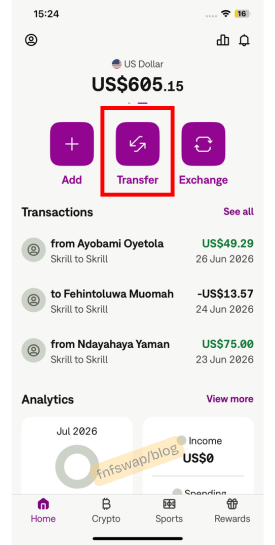
How to initiate a Skrill-to-Skrill transfer: using the Skrill App

This is the method I recommend for Nigerian users.

1. Log in to your Skrill account.

skrill dollar to naira exchange rate

2. Tap on Transfer

exchange skrill to naira at best rate

3. Select Skrill to Skrill

nigeria skrill withdraw

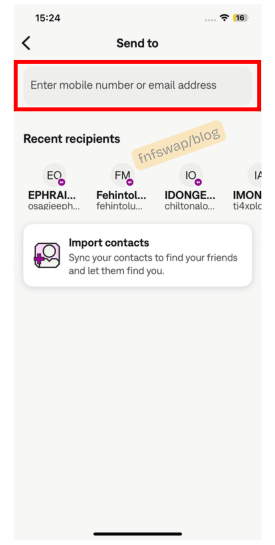
4. Enter the recipient’s Skrill email address – double-check this; there’s no recall once sent.
exchange skrill to naira

5. Enter the amount you want to send.

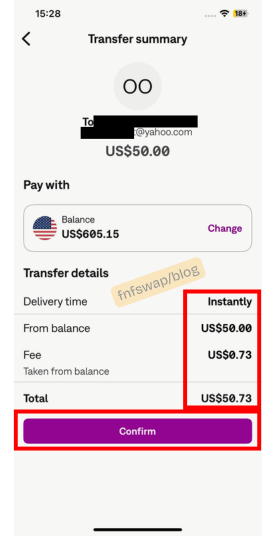
6. Review the transaction summary – fee, amount deducted, amount received.
skrill exchange rate usd to naira

7. Tap Confirm

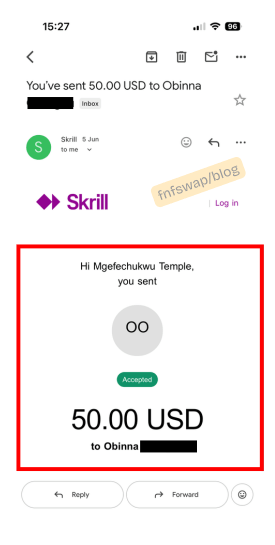
Skrill immediately sends you a confirmation notification and email. The recipient’s balance updates in real time.
skrill exchange rate usd to naira today

If you are using a browser, here is how to do it.

On the Skrill web browser version:

  1. Log in at skrill.com
  2. Click Send Money.
  3. Select Send to Skrill Account.
  4. Enter the recipient’s email and amount.
  5. Review and confirm

The process is identical, although the app version is slightly faster to navigate for most users, and both routes execute the same transfer.

Skrill to Skrill transfer fees: the full breakdown

This is where most guides get it wrong or oversimplify it, and where it matters most to get it right before you send it.

Skrill distinguishes between two types of Skrill-to-Skrill transfers when calculating fees:

1. Domestic Skrill-to-Skrill transfer (same country)

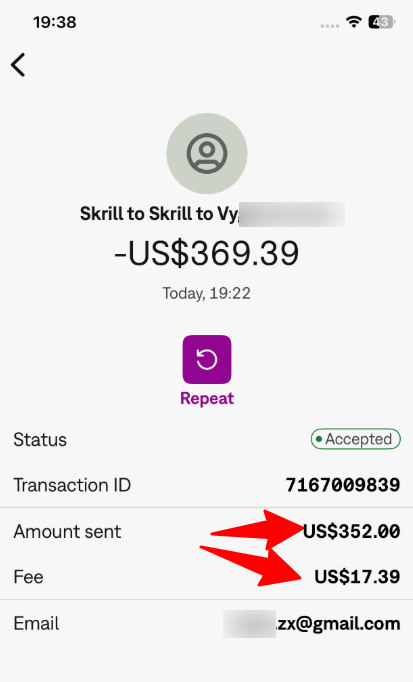
When both the sender and recipient are registered Skrill accounts in the same country, Skrill applies its domestic transfer fee of approximately 1.45% of the transaction amount, with a minimum fee of €0.50.

For Nigerian Skrill users sending to a Nigerian exchanger like fnfSwap, this is the applicable fee. Both accounts are Nigeria-based, which means the transfer is treated as domestic, and the 1.45% rate applies.

skrill exchange rate usd to naira

2. International Skrill-to-Skrill transfer (different countries)

When the sender and recipient are in different countries, an international fee applies.

Since April 2024, Skrill has updated this to 6.98% on international wallet-to-wallet transfers, a significant increase that affects users sending to exchangers or recipients based outside Nigeria.
skrill account fees today

This is why the exchanger you use matters: sending to a Nigerian-based exchanger (same country) costs 1.45%, while sending to an exchanger registered in a different country costs 6.98%, nearly five times more, before the exchange rate is even factored in.

In summary, Skrill to Skrill for foreign accounts is, at times, free. Like, USA to USA.

True Skriller Accounts Fees

Skrill operates a loyalty programme with upgraded account tiers. Verified “True Skriller” accounts, which require consistent account activity and meeting Skrill’s internal criteria, may receive reduced or waived transfer fees.

Most Nigerian casual users are on standard accounts, so the 1.45% domestic rate is the figure to plan around.

Fee summary table
Transfer TypeFeeMinimum
Domestic (same country, standard account)~1.45%€0.50
International (different countries)6.98%€0.50
True Skriller domesticReduced/free-
Receiving a Skrill-to-Skrill transferFree-

Key point: receiving Skrill funds is always free. The fee is charged to the sender, deducted from the amount sent, meaning the recipient gets slightly less than what was sent unless the sender accounts for the fee upfront.

Skrill to Skrill transfer limits

Skrill applies limits based on your account verification level, measured as lifetime cumulative incoming totals, not monthly caps.

Account LevelLifetime Incoming LimitVerification Required
Level 1 (Basic)Up to $999.99Email confirmation only
Level 2 (Verified)$1,000 – $2,999.99Government-issued ID
Level 3 (Fully Verified)$3,000 – unlimitedID + bank account verification

What this means in practice:

  • At Level 1, once your cumulative incoming Skrill transfers (from any source) cross $999.99, incoming transfers will be blocked until you verify
  • The limit is on incoming transfers – outgoing transfers follow separate daily and weekly caps that Skrill sets based on account status
  • If you’re regularly selling Skrill through fnfSwap or receiving payments from betting or forex platforms, moving to Level 2 or Level 3 proactively saves you the frustration of hitting the wall mid-transaction.

For outgoing transfers specifically, Skrill also applies daily sending limits that vary by verification level.

Standard accounts are typically capped at $2,500 per day for outgoing Skrill-to-Skrill transfers, with higher limits available at Level 3.

Always check your current limits under Settings > Limit and Verification before sending a large amount.

I took time to explain this in Skrill Level; check it out in full.

How long does a Skrill to Skrill transfer take?

Transferring money to another Skrill member takes less than a minute. This is the official position from Skrill, and in practice it’s accurate for standard transfers between verified accounts with no flags or holds.

What this looks like in the real world:

  • Standard transfer between two active, verified accounts: 30 seconds to 2 minutes
  • Transfer where the recipient’s account has recently been inactive: usually still instant, but can take up to a few minutes for the balance to update and notification to arrive
  • Transfers that trigger Skrill’s internal review can be held for minutes to hours, occasionally longer. This happens when unusual patterns are detected (large first-time transfer, new sender/recipient combination, account with pending verification)
  • Transfers sent while one party is using a VPN can cause delays or blocks due to Skrill’s system flags for IP location mismatches.

From our experience at fnfSwap, funding clients’ accounts with Skrill and Skrill-to-Skrill transfers are instant.

And if you are selling Skrill for Naira, once we confirm receipt of your Skrill transfer, Naira is paid to your Nigerian bank account within 15 minutes.

Skrill to Skrill transfer Errors: causes and fixes

This is the section most Skrill users wish existed before they ran into a problem. Here are the errors that come up most frequently, what triggers each one, and how to resolve them.

1. Error: “Transaction declined” or transfer not going through

Most common causes:

  • Your account verification level has been hit. Meaning, you’ve reached your lifetime incoming or daily outgoing cap
  • The recipient’s email address is entered incorrectly; even one wrong character sends the transfer nowhere, pending, or to the wrong account.
  • Your account has a pending restriction or compliance hold.

Fix:

  • Check your verification level under Settings > Limit and Verification
  • Triple-check the recipient’s Skrill email address before confirming, copy-paste, don’t type
  • Log out and back in, then try again; temporary session issues occasionally cause false declines
  • Contact Skrill support if the decline persists with no visible reason in your account dashboard.

2. Error: Transfer sent to the wrong email address

This is the most serious error and the hardest to reverse. Skrill-to-Skrill transfers are instant and irreversible once confirmed.

What to do:

  • Contact Skrill support immediately via live chat or their support portal; the sooner, the better
  • Skrill can attempt to contact the unintended recipient and request a return of funds, but they cannot force it
  • Prevention is everything here: always copy-paste the recipient’s email address, never type it manually

At fnfSwap, we provide our Skrill email address clearly in writing before every transaction precisely because of this risk. If you ever doubt the address, ask us to confirm before you send.

3. Error: Transfer sent to a missing letter Skrill email address

This occurs when a sender types a Skrill email address and misses 1 or 2 letters of the email address. In this case, when sent, it will show as pending on the recipient’s side and not delivered.

What to do:

Rush and log in to your Skrill account, check your dashboard, cancel the transaction, and the pending transaction will disappear.

This time do not type the email address; just copy and paste to avoid the same errors.

[image – copy and paste] Β 

4. Error: “Account restricted” or transfer blocked

Common causes:

  • Account is under a temporary compliance hold (new activity, large first transfer, recently added payment method)
  • The account hasn’t been used in over 6 months, and so Skrill applies an inactivity flag.
  • VPN or IP masking detected at the point of transfer.
  • Pending identity verification request that hasn’t been completed

Fix:

  • Check your Skrill dashboard for any notifications or verification requests, and complete them first
  • Disable VPN before accessing Skrill or initiating transfers. Skrill explicitly flags VPN usage as a cause of service disruption
  • Check your account operational status from the Dashboard section; follow instructions to resolve restrictions, if any.
  • If no notification exists, contact Skrill support directly

5. Error: Transfer pending for longer than expected

Common causes:

  • Skrill’s internal fraud prevention system flagged the transfer for manual review
  • Large transfer amount triggering additional verification
  • Transfer initiated outside Skrill’s peak processing window

Fix:

  • Check the My Transfers tab in your Skrill account for the transaction status
  • If you see “Verification Pending”, follow the instructions on screen and verify your account. If you see “Processing” and your funding has already been processed successfully, contact Skrill support.
  • Most pending reviews resolve within a few hours; if it exceeds 24 hours without resolution, escalate via Skrill support

6. Error: Incorrect amount received (fee deducted from expected total)

This is technically not an error, but rather the fee working exactly as designed. But it catches people off guard if they haven’t accounted for Skrill’s transfer fee upfront.

For instance, you send $100 to a recipient expecting them to receive $100. They receive approximately $98.55 (after the ~1.45% domestic fee is deducted from the amount sent).

Fix: if you want the recipient to receive a specific amount, send slightly more to cover the fee.

For fnfSwap transactions, we factor the fee into the rate calculation, so you know the exact naira payout before you send. There are no surprise deductions on our end.

7. Error: “Skrill to Skrill option not available”

Common cause: some Skrill accounts, particularly those primarily set up for merchant/business use or in certain restricted configurations, may not display the Skrill-to-Skrill β€œsend” option in the standard flow.

Fix:

  • Ensure you’re logged in via the full web browser version (skrill.com), not just the app; some account types display more options on the web.
  • Check that your account is personal, not a business account with restricted send permissions.
  • Contact Skrill support if the option is missing entirely with no clear reason.

Skrill to Skrill and fnfSwap: how it connects

Every Skrill-to-naira transaction at fnfSwap runs on the Skrill-to-Skrill mechanism described in this guide. Here’s how the two connect:

  1. You want to convert Skrill dollars to naira
  2. You contact fnfSwap at fnfswap and state your amount
  3. We quote today’s live Skrill-to-naira rate.
  4. You initiate a Skrill-to-Skrill transfer to fnfSwap’s Nigerian Skrill email domestic transfer, ~1.45% fee
  5. We confirm receipt and transfer naira to your Nigerian bank account within 15 minutes.

Because fnfSwap is a Nigerian-registered business operating a Nigerian Skrill account, your transfer stays in the domestic category.

Meaning the 1.45% fee, not the 6.98% international fee. That distinction alone saves you roughly ₦1,000–₦5,000+ on a standard $100–$500 transaction at current rates, compared to routing through an international exchanger.

Tips for smooth Skrill to Skrill transfers

Always copy-paste the recipient’s email address.

One wrong character and the money goes nowhere, or somewhere wrong. This is the single most preventable source of Skrill transfer problems.

Disable your VPN before transferring.

Skrill’s system treats VPN usage as a red flag. Turn it off before logging in, not just before sending.

Check your verification level before large transfers.

If you’re sending $500 and your daily outgoing limit is $250, the transfer won’t go through. A 30-second check under Settings > Limit and Verification saves the frustration.

Account for the fee in your amount.

If you need the recipient to receive exactly $200, send $202.90 to cover the ~1.45% fee. Or ask the exchanger how they handle fee calculation; fnfSwap factors this in before quoting your naira amount.

Keep your Skrill account active.

Log in or make at least one transaction every 6 months to avoid the inactivity flag and the €5/month inactivity fee Skrill charges on dormant accounts.

Use the same device and location you normally access Skrill from.

Sudden location changes, especially if you travel and access Skrill from a new country, can trigger security holds that delay transfers.

Can I send Skrill to Skrill internationally?

Yes, but the fee jumps to 6.98% for cross-country transfers (since April 2024), compared to ~1.45% for same-country transfers. For naira conversion, using a Nigerian exchanger like fnfSwap keeps your transfer in the domestic category.

Is Skrill to Skrill instant?

For standard transfers between verified active accounts, yes, usually under a minute. Transfers flagged for review can take longer.

What is the minimum Skrill-to-Skrill transfer amount?

Skrill’s platform minimum for wallet-to-wallet transfers is generally around $1 equivalent, but most Nigerian exchangers, including fnfSwap, have a minimum order of $25.

Can I cancel a Skrill to Skrill transfer after sending?

No. Skrill-to-Skrill transfers are irreversible once confirmed. Always verify the recipient’s email before confirming.

Does the recipient need to accept the transfer?

Generally, No. The funds land in the recipient’s Skrill wallet automatically; however, there are times the recipients will need to login and approve the Skrill transfer.

What happens if I send an unregistered email?

Skrill will attempt to notify the email address to set up a Skrill account. If the account isn’t created within a set window, the funds are returned to you.

Why did my transfer go through, but the recipient hasn’t received it?

Check the transaction in your My Transfers tab. If it shows “Complete” on your end, allow a few minutes for the recipient’s balance to update and the notification to arrive. If it shows any other status, refer to the error section above.

Similar Posts