Pi Network KYC Invitation Code: What It Is and How to Get One
If you have been mining Pi for months and you keep hearing people talk about a “KYC invitation code,” you are not alone in being confused.
This is one of the most searched Pi Network questions, and the answer has changed significantly over the past two years in a way that most articles on the internet still have not caught up with.
With a few people coming to ask if they can sell their Pi wallet, most of the time, the wallet is not even verified 😄
In this guide, I break down what the KYC invitation code is, whether you still need one in 2026, and what you actually need to do to get verified and migrate your Pi.
Note, for full KYC processes and Pi KYC Migration Pending Problems, see the A-Z Solutions.
Invitation vs Referral Codes in Pi Network
I know the above can be confusing because Pi Network actually uses the phrase “invitation code” in two completely different ways.
Type 1 -The Registration Invitation Code (Referral Code)
When you first download the Pi app and try to create an account, you are asked to enter an invitation code before you can register.
This is your inviter’s Pi username-the person who told you about Pi and whose link or code you used to join.
This is simply Pi Network’s referral system. Every pioneer has one. You cannot register on Pi without it.
Once you enter it and your account is created, that code links you to your inviter’s earning team, which slightly boosts both your mining rates when team members are active.
This type of invitation code has nothing to do with KYC. It is just how you sign up.
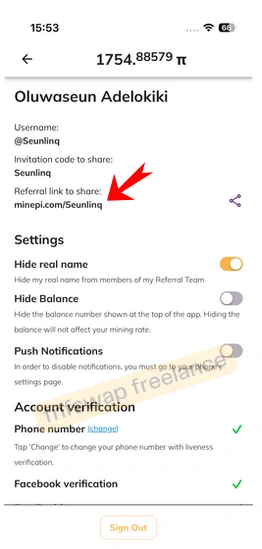
To see your referral code, go to your Pi app > navigate to the profile section > click on the referral link to share.
Type 2 -The KYC Slot Invitation
This is the one everyone is confused about.
You see, from 2021 through early 2023, Pi Network had a limited KYC system. They could not process everyone at once, so they gave out KYC “slots” randomly.
And when your slot opened, you received a pop-up notification in the app saying something like “Your KYC slot is ready.”
Pioneers called this the “KYC invitation,” and many were stuck waiting for it for months.
And yes, the system no longer works the way it used to. The Pi Core Team officially updated it.
The Truth About KYC Invitation Codes in 2026
According to the official FAQ page (minepi.com/kyc-faqs),
No, anyone except the two scenarios below should be able to visit the KYC app via Pi Browser and start your KYC application without waiting for an invitation. The invitation-based KYC slots assignment was only used in the past, and the process has been updated to allow anyone to start.
Read that again. You no longer need to wait for a KYC invitation in 2026.
The old slot-based system was retired. If you have been mining for at least 30 days (they do not need to be consecutive), you can walk into the KYC app in Pi Browser right now and start your application, no waiting, no invitation required.
So why are so many people still asking about KYC invitation codes? Because a lot of old articles, YouTube videos, and community posts from 2021 and 2022 are still circulating online and creating confusion. The information in most of those posts is outdated.
Who cannot start KYC immediately?
There are two specific situations where you may still be blocked from starting KYC, even in 2026:
1. You have not yet mined for 30 days
New accounts must mine for at least 30 days before becoming eligible for KYC. This requirement exists because Pi wants to prioritize real, committed users rather than accounts that were just created to grab a balance.
The 30 days do not need to be back-to-back. Just 30 total mining sessions across any period, and you are fine.
2. Your account has been flagged by Pi’s algorithms
A small number of accounts get identified by Pi’s automated systems as likely fake, bot-operated, or in violation of Pi’s terms of service. These accounts are blocked from starting KYC.
If you believe your account was flagged by mistake, Pi Network has a form for this at minepi.com/kyc-application-access, where you can submit your username for investigation.
If you are not in either of these two categories, you are eligible to start KYC right now.
How to Start Your KYC on Pi Network (Step by Step)
Since there is no longer an invitation-based queue in most cases, here is exactly how to go from eligible to verified:
Step 1. Download Pi Browser
KYC is not done inside the main Pi mining app. You need a separate app called Pi Browser, available on both Android and iOS.
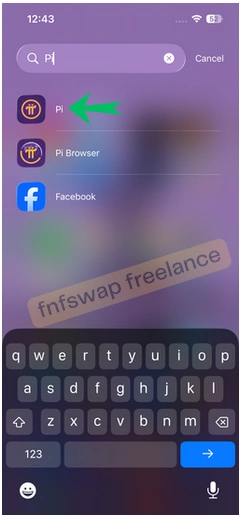
If you do not have it yet, go to your app store and search “Pi Browser”. It looks different from the main mining app.
Step 2. Open KYC.PI
Inside Pi Browser, type kyc.pinet.com in the address bar or look for the KYC app on the main interface. This is Pi Network’s official identity verification portal.
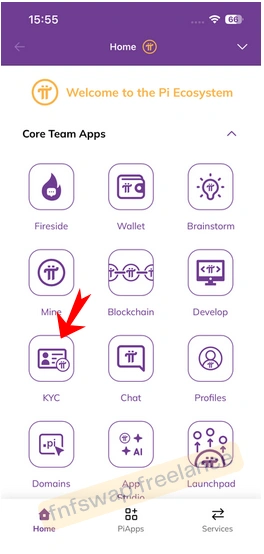
Step 3. Select your country and document type
You will be asked to choose your country and what document you want to use for verification. Pi Network accepts national ID cards and passports.
For Nigerians, your NIN slip, voter’s card, driver’s license, or international passport all work. Pick whatever document has a clear photo and your full legal name exactly as it appears in the Pi app.
Step 4. Upload your documents
You want to take clear photos of both sides of your ID. Pi recommends doing this in good lighting, in landscape mode, and making sure there is no glare, shadow, or blur on the document.
Note that if your photo is of poor quality, your application will likely get delayed or rejected.
Step 5. Complete the face scan
After uploading your ID, you will do a facial recognition check. This involves looking at your camera, smiling, and turning your head as instructed.
Make sure your face is well lit, and you are not wearing a hat or glasses that cover your face.
Step 6. Review and pay the 1 Pi verification fee
Before you submit, review everything. Check that your name matches exactly.
There is a 1 Pi verification fee charged to cover processing costs-this is the only legitimate fee. If anyone tells you to pay more than 1 Pi for KYC, that is a scam.
Step 7. Submit and wait
Once submitted, most applications are reviewed by Pi’s human validator network.
If everything is correct, approval can happen within 15 minutes. And if your case requires extra verification (called “Tentative Approval”), it may take longer, sometimes days or weeks, depending on your region and the volume of applications.
What Happens After You Pass KYC?
Passing KYC is not the final step. It is the gateway to what comes next. After your status shows “KYC Passed,” you still need to complete the Mainnet Checklist before your Pi becomes transferable.
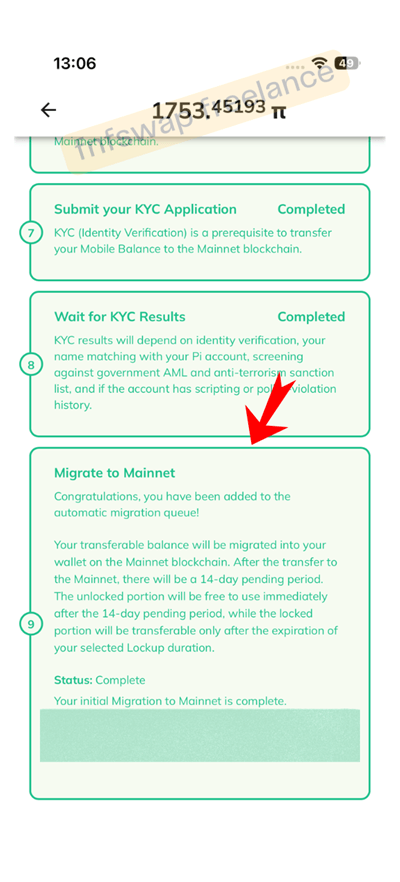
The checklist includes setting up your Pi Wallet and, importantly, setting up 2FA (two-factor authentication) using a trusted email address.
As of 2026, the 2FA step is mandatory before any migration can happen, because Pi transfers on the blockchain are irreversible. Pi will not let you migrate without it.
Once your checklist is complete and your migration is processed, your Pi moves from a “pending” state to your actual mainnet wallet balance, and from there, it becomes transferable and tradable.
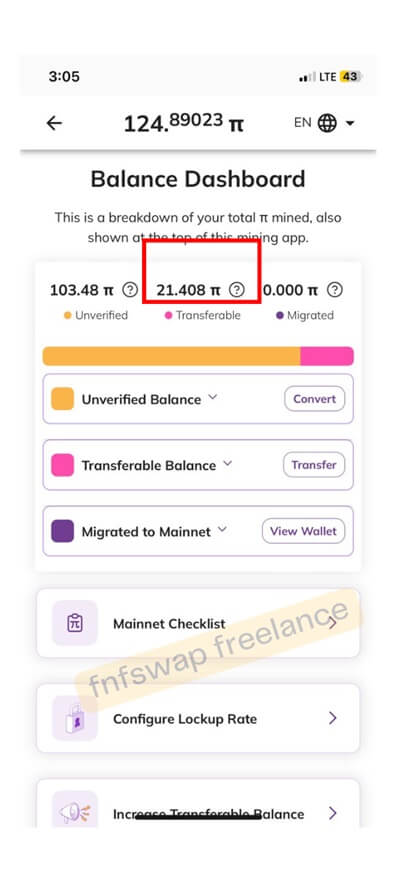
What Happens if the wallet Passed KYC and still returned to Tentative Approval?
If your wallet is working – meaning, you can send and receive Pi to the wallet, and you suddenly see the KYC section in Tentative Approval.
What you want to do is move on and use your wallet. No need to stress re-uploading anything unless you want to go through that again.
Why Your Referral Team’s KYC Matters
Here is something that has become even more important in 2026 that most guides do not explain.
Pi launched Second Migrations in early 2026, which allowed eligible pioneers to transfer additional Pi balances to the mainnet, including referral mining bonuses that were not included in the first migration.
However, Pi only releases referral bonuses that are tied to team members who have fully passed KYC.
This means that if people you referred to Pi have not done their KYC yet, a portion of your mining rewards is still locked.
The more your referral team completes KYC, the more bonus Pi you can migrate in the second migration round.
This is why you should actively encourage every person you referred to Pi to complete their KYC as soon as possible, not just for their benefit, but for yours too.
Common Mistakes to Avoid During Pi KYC
1. Using a name that does not match your ID
If the name in your Pi account does not exactly match your government ID, your application will be flagged. Middle names, name order, and even spacing matter. Sort this out before you start.
2. Paying for a KYC invitation
There are scammers online and on Telegram who claim they can get you a KYC slot faster for a fee in Naira or crypto. This is 100% a scam.
KYC slots no longer exist as a paid or gatekept service – you can access KYC directly through Pi Browser for free (plus 1 Pi).
3. Using third-party KYC websites
Some fake sites pretend to be Pi Network’s KYC portal. Only use kyc.pi through the official Pi Browser app. Never upload your ID documents to any other website claiming to be affiliated with Pi.
4. Ignoring “Tentative Approval
If your status says Tentative Approval, do not panic and do not abandon the process.
It means Pi is running additional checks on your account. Do not submit a new KYC application – just wait. Creating duplicate applications causes more problems.
5. Waiting for a pop-up that may not come.
The old system sent pop-up notifications when a KYC slot opened. While some pioneers may still see a pop-up as a reminder, Pi’s FAQ is clear that you should not rely on this pop-up as your trigger. Go into KYC.PI and check your eligibility directly.