All About UBA Dollar Prepaid Card: Client ID, Portal, Balance, & Uses
Client Identification Number (Client ID)
This is the 10-digit number printed on the back of your Africard.
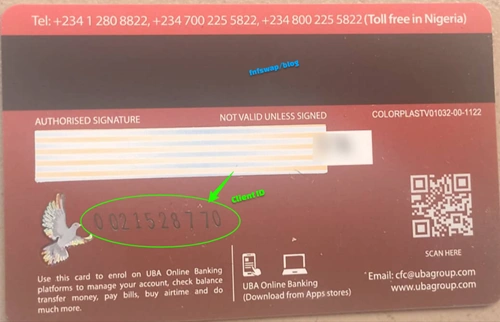
You can also find it written on the top left of the A4 paper attached to your bank-issued card.
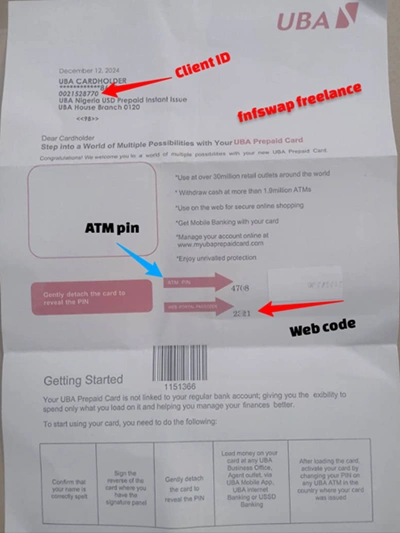
Kindly note that the Client ID is not the same as your 16-digit card number on the front. It’s a separate identifier that acts as your card account number.
What is it used for:
- Setting up your AfriCard portal for the first time – you’ll enter this and the web code to set up your username and password.
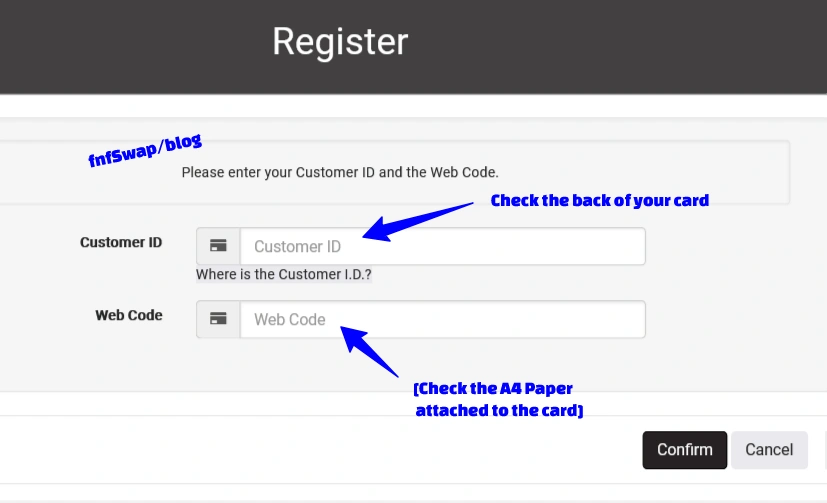
- Funding your card – this is the account number referenced when moving funds to your card.
0012730845
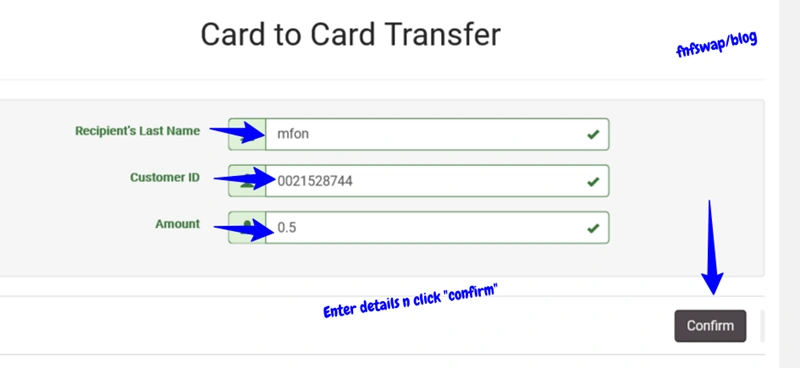
- Card-to-card transfers Details – this is the number you’d share with someone sending you funds, or that you’d need to send to someone else’s card
Many Formats of the Client ID
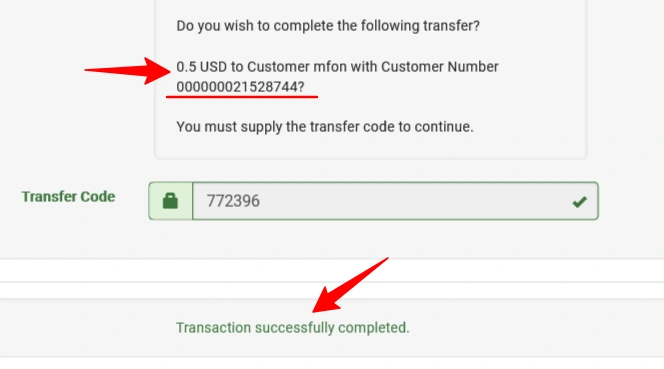
0021528744, 21528744, 00021528744, 00021528744, and 000021528744 are all the same, and they are all valid. The difference is the zeros in front.
Meaning that the main client ID is 8 digits. So, even if you add 7 zeroes in front of the 8 digits [000000013673728], the client ID is still valid.
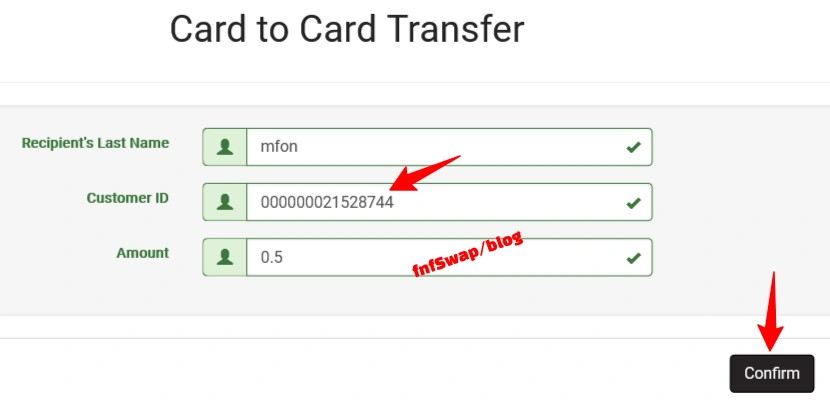
See an example below. I will fund a client ID with 10 zeroes + the main 8 digits.
WebCode/Web PIN
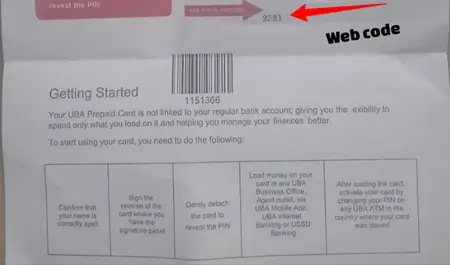
This is the second PIN on your PIN mailer (the A4 sheet attached to your card), separate from your ATM PIN.
What is it for?
Used as your passcode for the first-time portal setup, paired with your Client ID to create a new portal profile (username & passcode).
Web Code vs ATM Pin
- Both the web code and ATM have 4 digits, and each of them functions differently.
- The web code is for the Africard portal setup, while the ATM PIN is for card activation using the ATM/POS at the bank.
- The ATM PIN is the 4 digits on top, while the web code is at the bottom on the A4 paper attached to the card.
GtpSecureCard/UBA
This is the name of the Africard portal platform – the website to manage the card online. It can also be referred to interchangeably as:
- GtpSecureCard
- GtpSecureCard UBA Login
- myubaafricard login
- “UBA Card Login” / “AfriCard portal”
These all point to the same destination: the online dashboard where you check your balance, view statements, do card-to-card transfers, and manage your card settings.
The official URL is gtpsecurecard.com/UBA/
CFC (Customer Fulfilment Centre)
CFC is UBA’s dedicated support line for card-related issues. This support is separate from general customer service.
You’d contact CFC for things like:
- Reporting a lost or stolen card
- Notifying the bank of international travel (so your card isn’t flagged for fraud)
- Resolving card activation or portal access issues that you can’t fix yourself.
CFC is reachable via the phone numbers and email listed on UBA’s official prepaid card page.
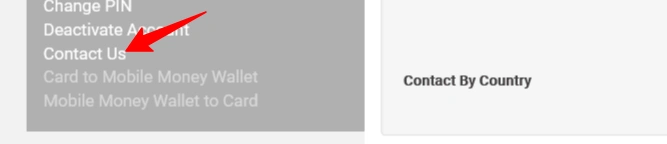
Keep these saved somewhere accessible, ideally before you travel, not after your card gets blocked abroad.
OCT Inflow (Original Credit Transaction)
This term shows up specifically in fee schedules, and it refers to funds coming into your card from external platforms, mostly from PayPal, but also from other payment processors that send money via this transaction type.
What to Note
OCT inflows carry their own fee, typically a percentage of the amount received. If you’re wondering why a PayPal transfer to your card arrived slightly short of what you expected, this fee is usually why – about 1.5%.
Card-to-Card Transfer
A feature on the portal that lets you send your card balance directly to another AfriCard holder’s balance.
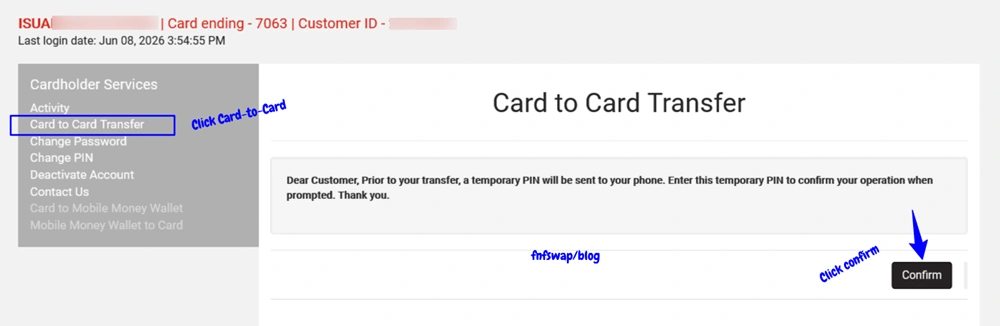
Capped at $300 per transaction. However, if you want to spend up to $1,000, you will have to break it down 4 times. $300, $00, $00, and $100.
How to Transfer Funds from Card to Card with UBA Dollar AfriCard
There is so much to learn about it, and how to do card-to-card.
(We covered this in detail in a previous guide – worth a read if you’re moving funds between cards regularly.)
Username and Passcode (Self-Created)
These are the login credentials to the portal at gtpsecurecard.com/UBA/
You generate them after setting up the portal with your Client ID and WebCode through the portal prompts to create your own username and passcode.
Common confusion about Username & Passcode
People sometimes go looking for a “username” that UBA assigned them at this stage, when really, the portal is just asking you to pick one.
You need to create a username that is easy to remember.
And what happens if you forget your username and passcode?
#1. You need to sit down and remember it.
#2. You will have to contact CFC (Customer Fulfilment Centre) for the recovery.
Transfer Code
A one-time code sent to your registered phone number to authorize transactions on the portal, most notably, card-to-card transfers.
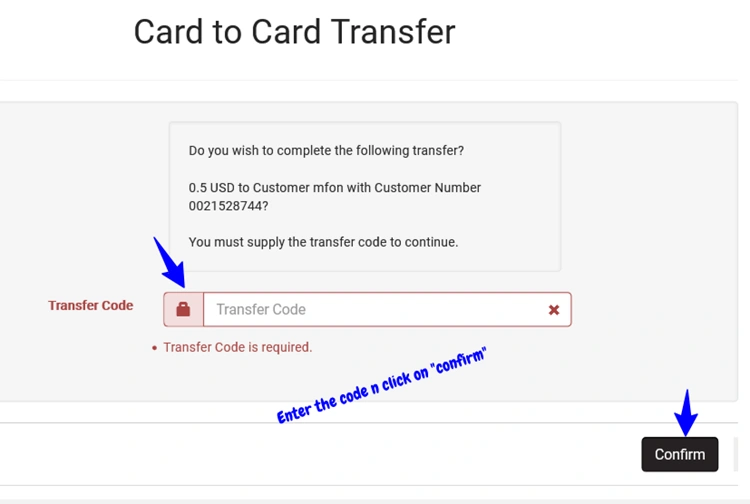
This code is time-sensitive, so if you wait too long after receiving it, you may need to restart the action to get a fresh one.
Card Issuance Fee/Annual Convenience Fee
Two separate charges you’ll see on your card’s fee schedule:
- Card issuance fee – a one-time percentage charge applied when the card is issued at the bank.
- Annual convenience fee – a yearly flat charge for maintaining the card.
Both are typically listed as “VAT Exclusive,” meaning VAT is added on top of the stated figure.
International ATM Withdrawal Fee
A percentage-based fee with a minimum charge, applied whenever you withdraw cash from a non-UBA ATM, especially abroad.
This is mainly for those abroad.
SMS Alert Fee
A small per-message charge for the SMS notifications you receive on card transactions.
It’s minor, but if you’re troubleshooting small discrepancies in your balance, you can disable SMS charge at the bank.
PTA/BTA (Personal/Business Travel Allowance)
These refer to foreign exchange allocations that can be loaded onto your dollar AfriCard, typically associated with travel purposes.
If you see these terms on funding-related pages, they refer to a specific category of dollar inflow with its own withdrawal rules (usually ATM/POS only, similar to PayPal inflows – not over-the-counter cash withdrawals).
How To Check UBA Dollar Prepaid Card Balance
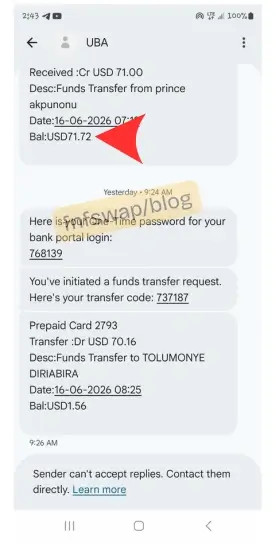
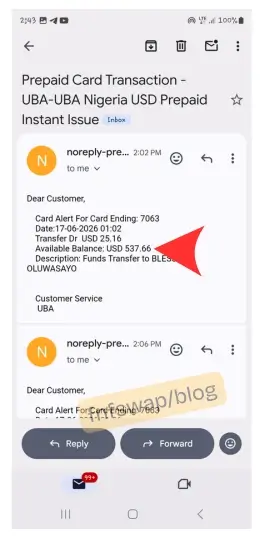
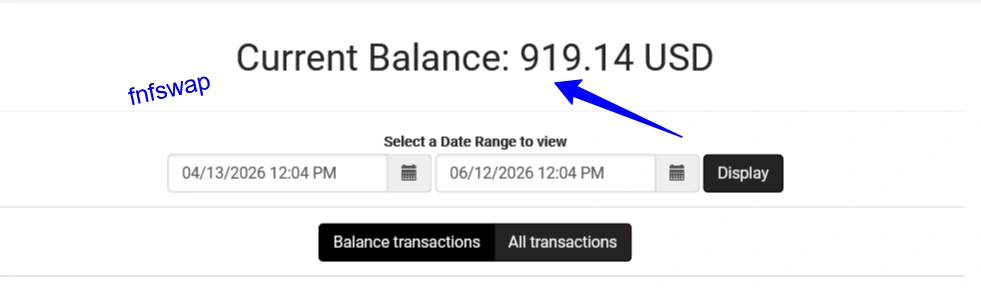
There are 3 ways to check your balance. You can do so via SMS, the Africard portal, and the email account linked to the account.
Via SMS
Check the inbox of the phone number linked to your Africard account at the bank.
Via Email Account
Check the inbox of the email account linked to your Africard account at the bank.
Via Gtpsecurecard UBA Portal
Check your card-to-card Africard account to see your balance.
All you need to do is log in to the portal using your username and passcode, and then you will find your available balance.
How to Know My UBA Prepaid Account Number
Your client ID is the same as the UBA Dollar Prepaid Account Number. You find it by checking the 10 digits at the back of the card.
Best PayPal Account Country for UBA AfriCard
The best PayPal countries are Lesotho – business, UK business (preferably a personalized Africard), and Serbian PayPal.
What is the UBA Prepaid Card (AfriCard) Used For?
1. PayPal Withdrawals
The AfriCard is one of the most popular tools for moving funds out of PayPal into Naira.
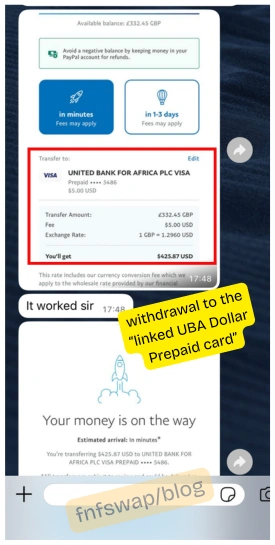
It works as a Visa-branded card that lets you receive funds from PayPal and convert them to Naira, and it’s available to anyone, even non-UBA account holders.
Here is how it works. Also, how to set it up for withdrawals.
How To Link UBA Prepaid Card to PayPal Nigeria for Withdrawals to Bank
2. Online Shopping (International)
The card works on AliExpress for international shopping, making it ideal for Nigerians buying goods from Chinese or global marketplaces without needing a domiciliary/dollar account.
3. Digital Ad Spending
It works for funding Facebook, Twitter (X), and Google/YouTube ad accounts, a major use case for digital marketers and SME owners who need to run international ad campaigns.
4. Web Hosting & Domain Purchases
The card works on Hostinger for website hosting and domain services, making it the go-to card for Nigerian bloggers, developers, and online entrepreneurs.
5. International School Fees & Relocation Payments
It works for WES credential evaluations, visa application fees, and international college tuition payments – critical for Nigerian students and immigrants navigating study-abroad processes.
6. Subscription Services
The card is designed for paying for subscriptions and transacting with digital platforms – think streaming services, SaaS tools, cloud storage, and productivity apps billed in Dollars.
7. Starlink Payments
The AfriCard works for Starlink satellite internet payments – a growing use case as Nigerians in underserved areas adopt Starlink.
8. Freelancer Dollar Spending
For Nigerian freelancers who earn on Payoneer, Deel, or similar platforms and need a way to spend their dollar earnings globally, the AfriCard serves as a physical Visa card with a daily spend limit of $1,500 and a monthly cap of $10,000.
9. Storing Dollar Value
Instead of opening a domiciliary dollar account, the UBA Dollar Prepaid card is a good option to hold USD, spend, or swap for Naira when you want to.