Does UBA Prepaid Card Work on PayPal in 2026? (Full Answer + Set up)
If you are a Nigeria-based freelancer, small business owner, or digital marketer who holds PayPal funds and wants to withdraw to a local card, the best card is the UBA Dollar Prepaid Visa Card β a free and standalone card for all Nigerian citizens.
And does it still work on PayPal?
YES. The UBA Dollar Prepaid Card (also called the UBA AfriCard) works on PayPal in 2026. One of our clients used it yesterday.
So, yes, you can link the card to a PayPal account to receive withdrawals and make payments online.
I’ve personally used this card to withdraw funds from PayPal through fnfSwap for years. And even last year, I did show it in a video lesson.
Today, I’ll walk you through everything: how it works, exact steps to link it, fees you’ll pay, and how to fix the dreaded “your card has been declined” error if it shows up.
Letβs get started.
Table of Contents
ToggleDoes a UBA Prepaid Card Work on PayPal?
Yes, it does. However, you must use the UBA Dollar Prepaid Card, not the Naira version.

Here is the short version of everything you need to know:
- The UBA Dollar AfriCard (Visa-branded) is accepted on PayPal.
- It works for PayPal accounts in a few African countries, the UAE, Serbia, and many other regions.
- It does not apply to USA-registered PayPal accounts β οΈ
- You can both link the card for payments AND receive PayPal withdrawals onto the card
- You do NOT need a UBA bank account because the card is standalone and available to everyone
- The card must be funded and activated first. Meaning, an unfunded card will always be declined on PayPal when you try to link it.
UBA Naira Prepaid Card vs UBA Dollar Prepaid Card. Which One Works & Best for PayPal?
UBA offers two prepaid card variants. Knowing the difference will save you a lot of frustration and time-wasting.
| Feature | UBA Naira Africard | UBA Dollar Africard |
|---|---|---|
| Currency | Nigerian Naira (β¦) | US Dollar ($) |
| Works on PayPal? | β Limited / Not recommended | β Yes β fully supported |
| International payments | β Limited / Not recommended | β Yes β fully supported |
| PayPal withdrawal | β Does not work | β Best option |
| Transaction platform | OTC / Mobile bank | https://www.gtpsecurecard.com/UBA |
| Activation fee | β¦1,000 | $3.15 |
| PayPal linking fee | β | ~$2 (deducted during verification) |
| OCT inflow fee | 1.5% | 1.5% |
| Who can get it | UBA & non-UBA customers | UBA & non-UBA customers |
| Monthly spend limit | Local limits apply | Up to $10,000/month |
The verdict: For PayPal, always go for the UBA Dollar Prepaid Card.
It is a Visa card, available to anyone – even if you have no UBA account, and it handles international inflows from PayPal without friction.
Can a non-UBA customer get and use the UBA prepaid card?
Yes, anyone can get the card and use it even if you are not a UBA customer.
Requirements Before Linking Your UBA Card to PayPal
Before you attempt to link your UBA Africard to PayPal, have all of the following ready:
On the UBA card side:
- A UBA Dollar Prepaid Card (collect from any UBA branch β I recommend the headquarters in your state).
- Card must be funded – minimum $6 recommended (to cover the $3.15 activation fee + ~$2 PayPal verification charge), but funding $10 upfront is safer.
- Card PIN must be changed at an ATM or the POS over the counter. This completes the activation process.
- Your BVN details must match the name on the card exactly
On the PayPal side:
- A working PayPal account from eligible countries (not a limited or unverified account).
- Access to the email and phone number linked to your PayPal (to receive
- verification codes).
Personal note from Isuamfon: I’ve seen many people ask and then try to link a fresh, unfunded prepaid card and wonder why PayPal rejects it.
The card is essentially “inactive” until you load it with money and change the PIN at an ATM.
As I explained here, this is the #1 reason for card declines during PayPal linking.
Which PayPal Countries are the Best for UBA Dollar Prepaid Card Withdrawals?
The best PayPal countries for Nigerians to withdraw using the UBA Dollar prepaid card are:
- Lesotho – first choice β
- Mozambique.
- Romania.
How to Link UBA Prepaid Card to PayPal β Beginner’s Steps
Once youβve collected, funded, and had fees deducted for full activation, follow these steps exactly:
Step 1: Log in to your PayPal account.
Log in using the correct PayPal country TLD (Top-Level-Domain) or URL, and go to PayPal.com to sign in.
For instance:
If you are using a Lesotho PayPal, use the correct URL β https://www.paypal.com/ls/home
If you are using a Romanian PayPal, use the correct URL https://www.paypal.com/ro/home
And should you want to confirm whether the URL is correct, check the flag country at the bottom of the page.
Lesotho π±πΈ belowπ

Romania π·π΄ belowπ

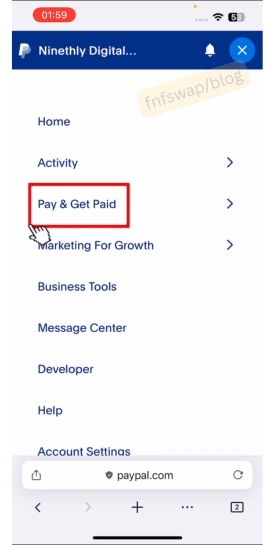
Step 2: Navigate to Pay & Get Paid
Look at the top left menu section and click on “Pay & Get Paidβ.

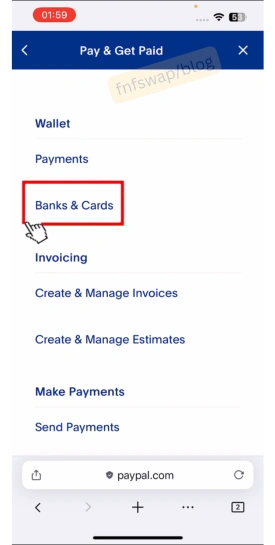
Step 3: Click Banks & Cards
Upon clicking βPay & Get Paidβ, you will open the βWallet section. Under it, look for and click βBanks & Cardsβ.

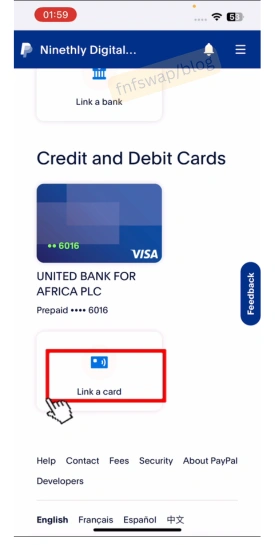
Step 3: Link a Card
Select “Link a card” and enter the details.
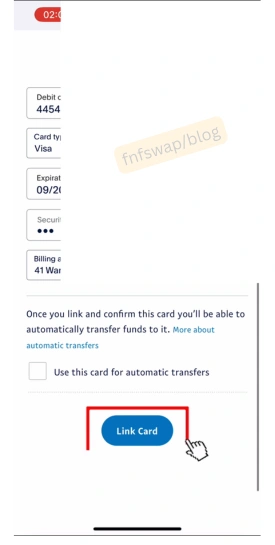
Step 4: Enter your UBA card details
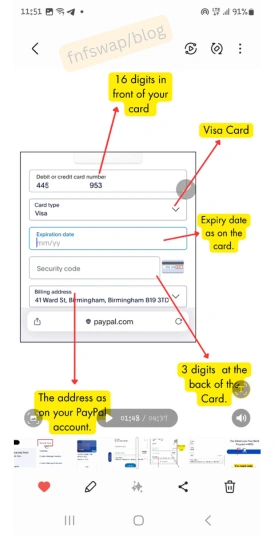
Enter your 16-digit card number, card type β Visa, expiry date, and CVV (the 3-digit number on the back of the card).
Step 5: Submit and wait for the verification charge
After entering your card details, click βLink Cardβ and wait for the response.

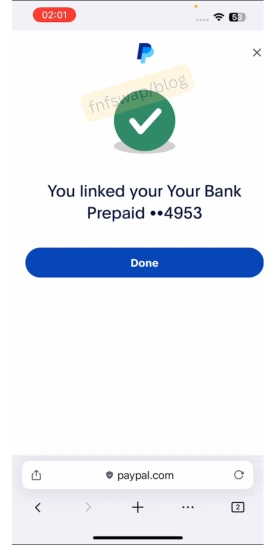
If everything is done well, you will get a success message βYou linked your Bank Prepaid …4894.

Click done.
The next step is to confirm the card so you can start withdrawing without complications.
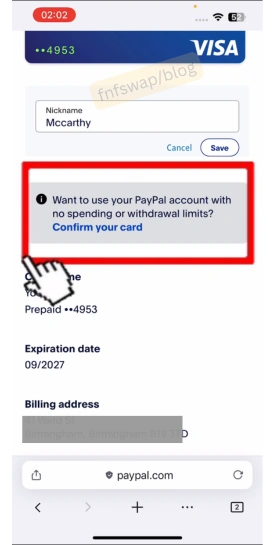
Step 6. Click on Confirm & Get Code
Still under βCredit and Debit Cardsβ, click on βConfirm your Card.β

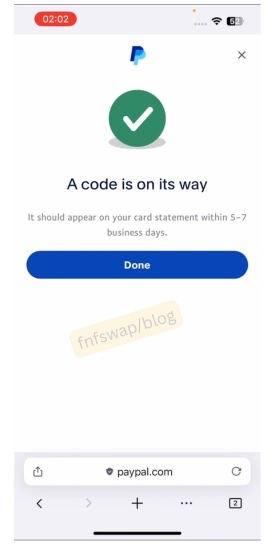
Go ahead and click βGet a codeβ to finish the setup.

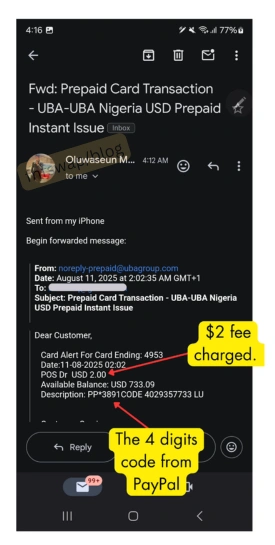
PayPal will send a small verification charge (approximately $2) to your card. UBA will send an SMS notification to the phone number linked to your BVN with a 4-digit code embedded in the transaction description.
Alternatively, you will receive it in your email account.
Step 7: Enter the 4-digit code on PayPal
Go back to PayPal, enter the 4-digit code from the UBA transaction message, and confirm.
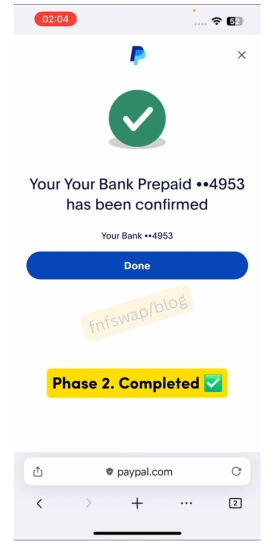
When done, your card will be confirmed. Click on Done, and that is all.
β Your UBA Dollar Prepaid Card is now linked to PayPal.
Now, letβs see how you can withdraw from the card.
Β How to Withdraw PayPal Money to Your UBA Africard
Once linked, withdrawing PayPal funds to your UBA Dollar card is straightforward:
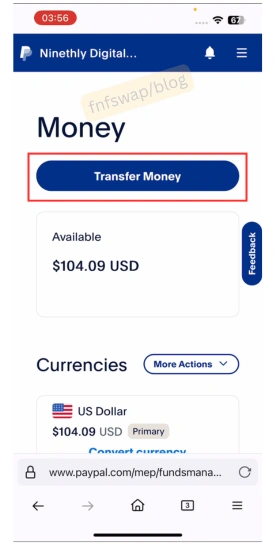
- Log in to your PayPal account.
- Go to Wallet β Transfer Money

- Select “Transfer to your card” and choose your linked UBA Africard.
- Enter the amount you want to withdraw.
- Review the fees (PayPal’s international withdrawal fee + 1.5% OCT inflow fee from UBA).
- Confirm the transfer.
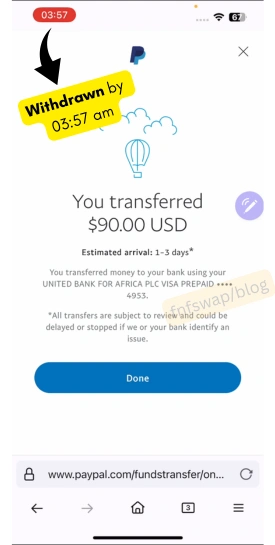
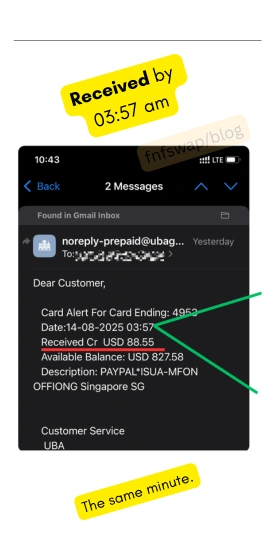
Settlement time: The settlement is instant, as you will get an alert in 1-2 minutes.Β

That is all about it.Β
Nonetheless, officially, the funds can take up to 1β5 business days to reflect on your UBA Dollar card β especially if PayPal needs to confirm the source of your funds.
Ways to Spend the UBA Prepaid Card Funds Withdrawn from PayPal
Once the dollars land on your AfriCard, you have options:
- Withdraw Locally: Convert to Naira via fnfSwap for a better-than-bank exchange rate (more on this below).
- Withdraw Abroad: Withdraw at any international ATM using your PIN
- Spend Online: Spend directly online (AliExpress, Hostinger, Facebook Ads, Google Ads, Starlink, etc.)
But can I withdraw from any UBA Bank branch?
No, you cannot. According to UBA, PayPal inflows can only be withdrawn at an international ATM or spent online. That is, you cannot walk into a branch and cash out over the counter.
But that is no issue, because fnfSwap freelance is there to convert your UBA prepaid Card funds for Naira in less than 3 minutes. Β Here is how to do it.
How to Withdraw/Convert/Swap/Sell UBA Dollar Prepaid Card for Naira to Bank Account
To sell your card dollars to Naira, fnfSwap freelance will process that for you.
You meet us, we agree on the exchange rate, we issue you our client ID details, you send, we confirm, and you get paid Naira in less than 3 minutes.
Here is the typical process of a transaction done today.
1. Confirm Exchange Rate
When you meet us, we will relate the current exchange rate of the UBA Dollar Prepaid for Naira.
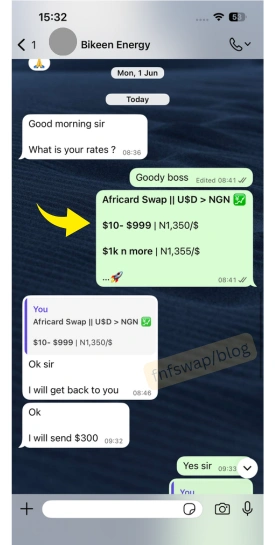
Kindly note that there is no fixed rate. The rate is directly proportional to the market value.
2. Log in to UBA Card Portal
The UBA Card portal at https://www.gtpsecurecard.com/UBA/
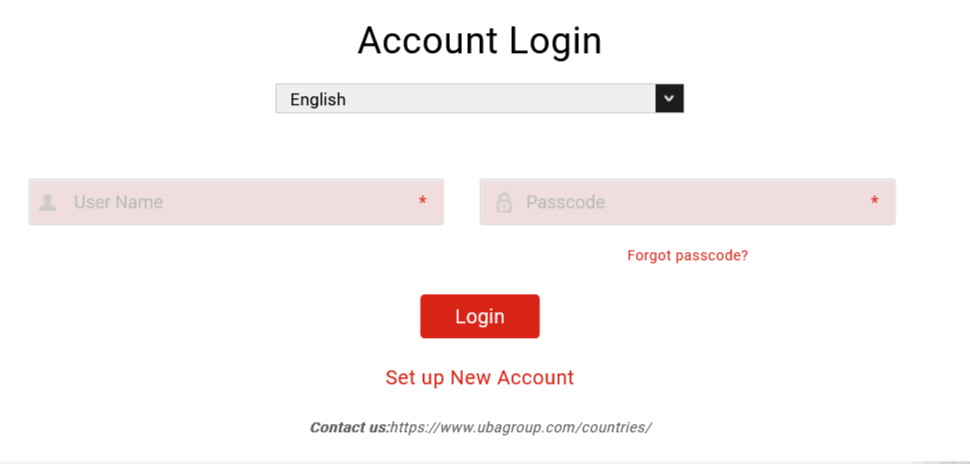
Note: you will need to create an account on the site if you havenβt.
In case you donβt have an account, here is how to set one up on the UBA website. Β Β Β Β Β Β Β
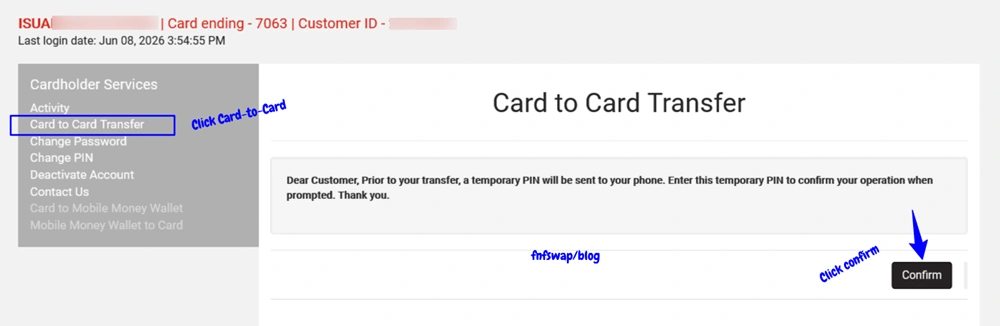
3. Enter the Card Details
Having logged in, click on βCard to Cardβ.

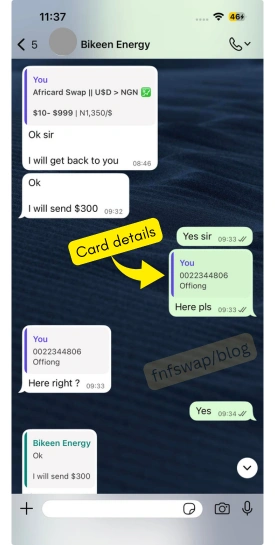
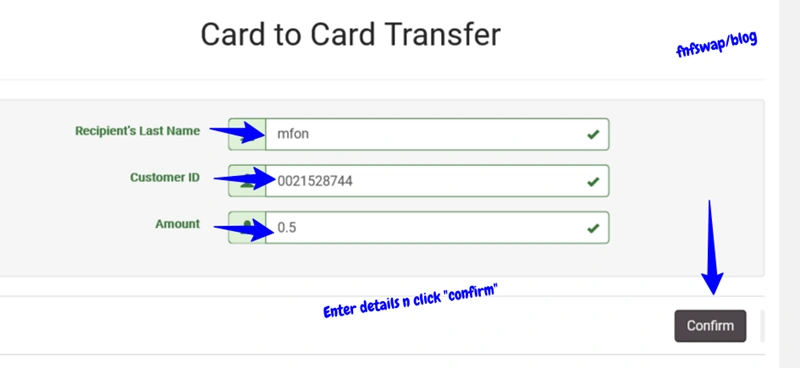
Enter the details of the prepaid card we give you.
You will receive:
#1. Client ID β 10 digits.
#2. Last name

4. Send Funds
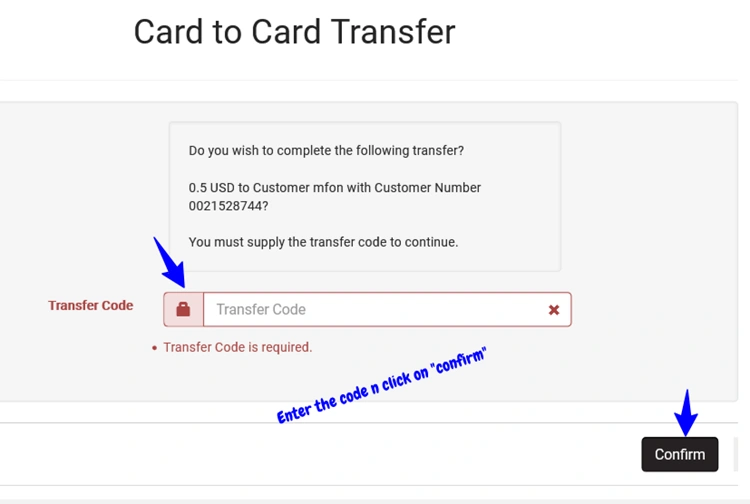
Enter the amount and click on βTransferβ.

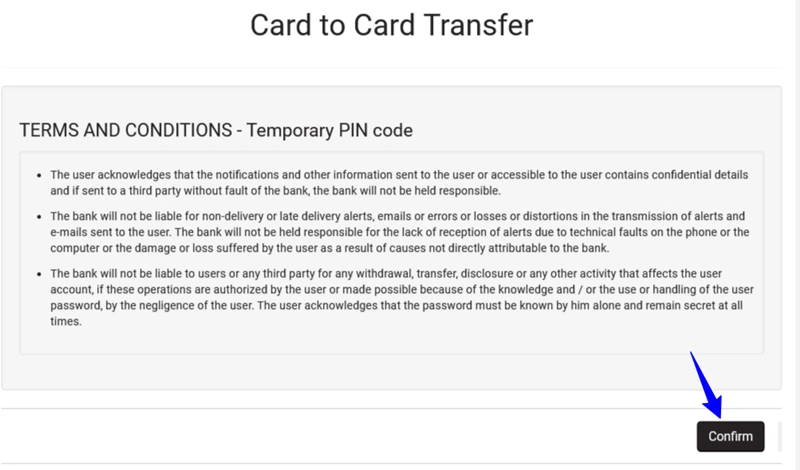
Click on the βconfirmβ button.

Enter the code and click βconfirmβ.

Screenshot and send to us β as a receipt – get it from your sms inbox, email, or your dashboard.
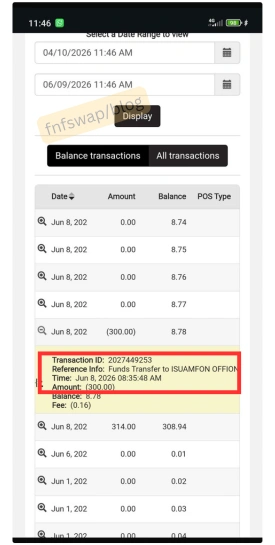
5. Receive Naira
When the prepaid card dollars sent is confirmed by fnfSwap, you drop your bank details, and funds will be sent to your bank details. That is all.
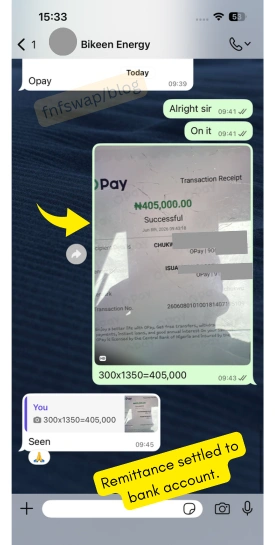
That is all about the process, and how it has been working for al our clients at fnfswap freelance.Β
Dollar Card for Naira Fast, safe & peer-assisted
Fees You Must Know Before Using UBA Card on PayPal
Here is the complete fee breakdown, so you know:
One-time card fees (paid once):
- Card issuance: FREE (for Nigerians).
- Activation fee (Dollar card): $3.15 – one time
- Activation fee (Naira card): β¦1,000
PayPal linking fees:
- PayPal verification charge: ~$2 (this is the test charge deducted when linking)
Transaction fees (ongoing):
- OCT inflow fee (PayPal withdrawals, other inflows): 1.5% of transaction amount – charged by UBA, VAT exclusive.
- Example: Withdrawing $100 from PayPal β UBA deducts $1.50, you receive $98.50
ATM withdrawal fees:
- Withdrawing cash at an international ATM attracts ATM operator charges (varies by machine/country)
Exchange rate for Naira Locally:
- When you convert from your Dollar card to Naira (e.g., via fnfSwap), the rate is typically better than CBN/commercial bank rates.
Why Is Your UBA Prepaid Card Declined on PayPal? (Fix It)
The error “Your card has been declined. Please try a different payment method” is the most common problem people face when linking UBA Africard to PayPal.
Here are all the known causes I have seen and experienced, and how to fix each of them:
Cause 1: Card is not activated (most common).Β
Fix: Fund your card with at least $6 and change the default PIN at a UBA ATM. Only then retry.
I always recommend funding at $10 since the money is still yours to keep, right? Yesh.
Cause 2: BVN name mismatch
There may be a BVN profile mismatch.
That is, if your BVN shows “Amanam R. Peters” but your card shows “Peter Amanam,” PayPal’s fraud checks will flag it.
Fix: Visit a UBA branch and request a name correction or update your BVN details.
Cause 3: You’re trying to link to a USA-registered PayPal account
The UBA Africard is not confirmed to work with US PayPal accounts. It works reliably with African and most international (non-US) PayPal accounts β European accounts.
Fix: Use a PayPal account registered in a supported country β I recommend Lesotho, before others.
Cause 4: Insufficient Card balance
PayPal makes a small test charge during verification. If your card balance is below what PayPal charges, it will decline.
Fix: Ensure a minimum of $6β$10 is loaded on the card before linking.
Want to fund your prepaid card? Do it in minutes.
If after the above, you still have difficulties with the card not linking, check the complete hacks here to link it successfully.
Frequently Asked Questions
Does a UBA prepaid card work on PayPal in 2026?
Yes. The UBA Dollar Prepaid Card (AfriCard) is accepted on PayPal in 2026. You need to activate and fund it first. It works for PayPal accounts registered in Nigeria, most African countries, and international accounts (Lesotho, Romania, Serbia, etc.).
Can I use the UBA Naira prepaid card on PayPal?
The Naira AfriCard has limited and unreliable PayPal acceptance. For consistent results, always use the Dollar Prepaid Card for PayPal transactions.
How long does a PayPal withdrawal to a UBA card take?
It is instant. And it can take 3β5 business days if there are checks on your account.
Is there a fee to withdraw from PayPal to a UBA card?
Yes. UBA charges a 1.5% OCT inflow fee on all PayPal inflows to the card (VAT exclusive). PayPal may also apply its own international transfer fee.
Can I get the UBA Dollar Prepaid Card without a UBA bank account?
Yes. The UBA Dollar AfriCard is a standalone prepaid card. You do not need a UBA savings or current account to obtain one. Walk into any UBA branch with a valid ID and request the card.
What is the monthly spending limit on the UBA Dollar Prepaid Card?
You can spend up to $10,000 per month with the UBA Dollar Prepaid Card.
Can I withdraw PayPal funds as cash using the UBA card?
Yes, but only at an international ATM – not over the counter at a UBA branch. PayPal inflows cannot be withdrawn via branch cash-out, according to UBA’s policy.
Alternatively, withdraw at fnfSwap freelance.
The UBA card is linked to my PayPal, but I can’t make purchases. What’s wrong?
Ensure your card is funded. A linked but unfunded card will fail at the point of purchase. Also check that you haven’t exceeded your daily/monthly transaction limits.
Does the UBA Africard work on US PayPal accounts?
This has not been confirmed. From personal experience and user reports, the card works on Nigerian and most African PayPal accounts, UAE PayPal, and Serbian PayPal, but US-registered PayPal accounts have not been tested successfully.
Β Can you withdraw PayPal Balance Funds? Β
If you are using a USA, UK, Canadian, or any other PayPal country, you can send the money as fnf β friends and family, and then you can withdraw it by sending the balance to fnfSwap.
How it works:
- You send your PayPal USD balance to fnfSwap’s verified PayPal account.
- fnfSwap converts at the day’s exchange rate (typically better than bank rates)
- You receive Naira in your local bank account – usually within 1-2 hours.
β Convert PayPal to Naira via fnfSwap
Summary
| Question | Answer |
| Does the UBA prepaid card work on PayPal 2026? | Yes. Dollar card only |
| Which card do you need? | UBA Dollar Prepaid Card (AfriCard) |
| Do you need a UBA account? | No. Anyone can get it |
| Activation fee | $3.15 (Dollar) / β¦1,000 (Naira) |
| PayPal inflow fee | 1.5% OCT |
| Withdrawal timeline | 3β5 business days |
| Card declined fix | Fund + activate at ATM first |
| Best alternative | fnfSwap instant Naira conversion |