How to Sell/Withdraw UBA Africard to Naira using 5 Ways (2026)
There are five ways to convert your UBA AfriCard dollar balance into Naira in 2026:
- ATM cash withdrawal (works for all cards, 0.6% fee)
- Card-to-card transfer via the AfriCard portal (send to fnfSwap or another user)
- Domiciliary account transfer (UBA customers only – only works if funds are NOT from PayPal)
- Branch/over-the-counter withdrawal (severely limited – does NOT work if funds came from PayPal).
- Skrill (open Skrill, link card to Skrill, pay fees, and wait up to 72 hours for it to reflect).
Truth is, whichever method works for YOU depends almost entirely on where your AfriCard funds came from, how fast you want the transactions, and stress relief.
See what I mean below.
If the money came from PayPal, this source is often from freelancers and online earners using this card. The steps for selling for Naira are simple.
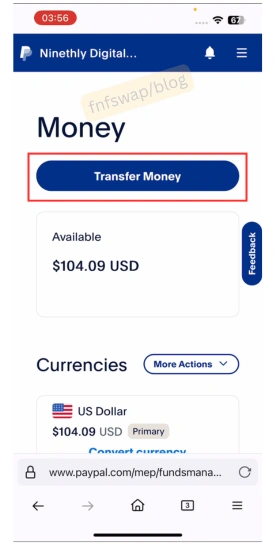
Withdraw from Payal to card > send from card-to-card to [fnfSwap freelance’s details] using gtpsecurecard.com/UBA/ > receive Naira in less than 3 minutes.
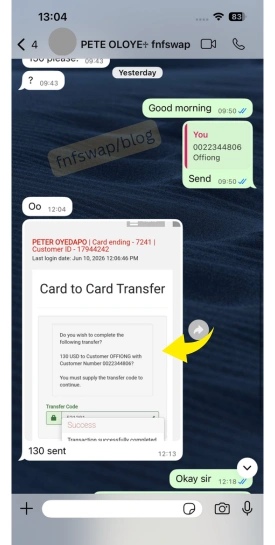
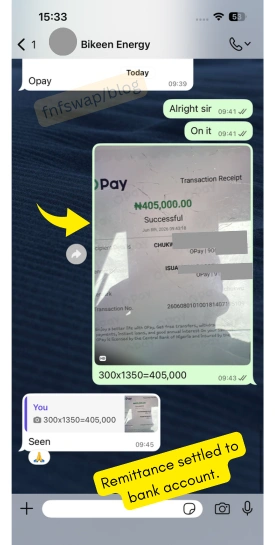
Keep reading, because the rules are different for you.
At fnfSwap – a peer-assisted exchange platform that has processed thousands of UBA AfriCard funds to Naira for Nigerian freelancers since 2022. Everything in this guide comes from real operational experience with screenshots plus real-time reviews – not theory.
Table of Contents
ToggleThe Most Important Rule: Where Did Your Funds Come From?
Before you attempt any withdrawal or sale method, you need to know this: UBA applies different withdrawal rules depending on the SOURCE of your AfriCard funds. Here is a summary.
| Fund source | Int'l ATM | Branch counter | Dom transfer | P2P sell (fnfSwap) |
|---|---|---|---|---|
| Branch cash deposit | ✅ | ✅ | ✅ | ✅ |
| Dom account transfer | ✅ | ✅ | ✅ | ✅ |
| PayPal inflow | ✅ | ❌ Blocked | ❌ Blocked | ✅ |
| Card-to-card transfer | ✅ | ❌ Blocked | ❌ Blocked | ✅ |
The critical warning: If your funds originated from a PayPal withdrawal/inflow, UBA has officially blocked over-the-counter cash withdrawals and DOM account transfers for those funds.
This was implemented to prevent abuse of the OCT (Original Credit Transaction) inflow channel. The ATM and card-to-card (P2P sell) routes remain fully functional.
Talking about the ATM, kindly note that this is only possible on an international ATM, and so, no ATM in Nigeria can dispense Dollars or Naira for the UBA Dollar Card Funds inflow.
My experience running fnfSwap: This branch withdrawal block is the single most common frustration I see from new users.
Someone walks into a UBA branch with $300 in AfriCard funds from PayPal and is told they can’t withdraw.
That’s not a rumor – it’s UBA’s current policy. Always confirm your fund source before planning your withdrawal method.
With that aside, let’s go in deeper to see various withdrawal methods for the UBA AfriCard funds.
Method 1. ATM Cash Withdrawal
Best for: Anyone who wants physical dollar cash or can withdraw from an international ATM.
Does it work for PayPal-sourced funds? ✅ YES
The UBA AfriCard is a Visa card, so it works at any Visa-enabled ATM worldwide. This is the most direct and independent method.
Does it work in Nigeria? No
How to do it:
- Ensure your AfriCard is activated (funded + PIN changed at a UBA ATM)
- Go to any ATM that accepts Visa – preferably an international ATM for dollar-denominated withdrawals
- Insert the card, select withdrawal, and enter your 4-digit PIN
- Withdraw your desired amount
Fees for ATM withdrawal:
- International ATM withdrawal fee: 0.6% of the transaction amount (charged by UBA)
- Additional ATM operator surcharge (varies by bank/machine)
- Currency conversion applies if the ATM dispenses local Naira (not dollars)
Limitations:
- Daily withdrawal limit: $1,500
- Monthly/quarterly transaction cap: $10,000 (note: from firsthand usage, this appears to be a quarterly, not monthly, cap)
When is this NOT the best option? If you need Naira in your bank account – not physical dollar cash. The ATM method requires extra steps (ATM cash → bank deposit).
Therefore, the card-to-card transfer to fnfSwap is faster and gives a better exchange rate.
Method 2. Card-to-Card Transfer (Best Method for Selling to Naira)
Best for: Converting AfriCard dollars to Naira in your bank account instantly.
Does it work for PayPal-sourced funds? YES
Can non-UBA customers use this method? YES
This is how the majority of Nigerian freelancers and digital entrepreneurs cash out their AfriCard PayPal-sourced dollars. The interesting part is that this process is instant.
Here is how it works
- You withdraw from PayPal to your UBA prepaid card.
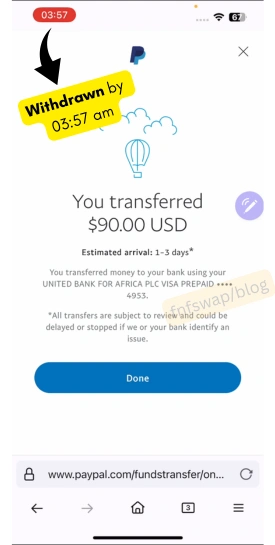
- The withdrawal is instant.
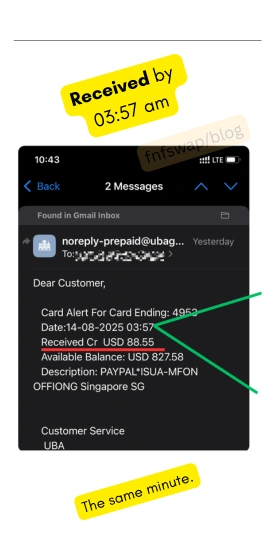
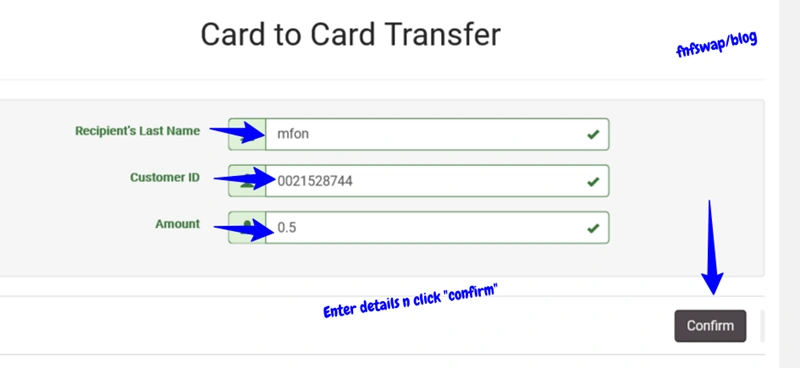
- You send the funds from card-to-card = instant transfer.
- You receive Naira in less than 3 minutes.

This has been the method hundreds of online hustlers have used on fnfSwap with many reviews like these. Let’s see how it works.
How the card portal works: UBA operates an online AfriCard management portal at gtpsecurecard.com/UBA/Login
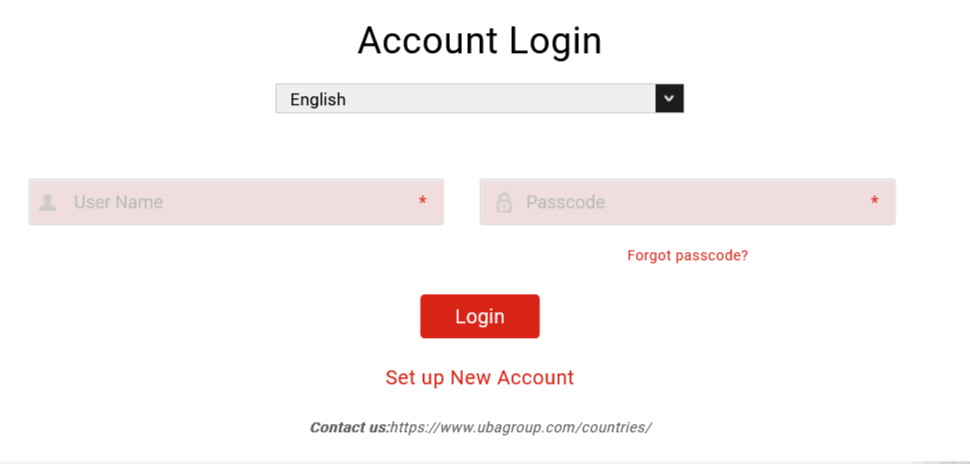
Through this portal, you can:
- View your card balance and statement.
- Transfer funds to other AfriCard users.
- Change your password.
- Contact customer support.
What you need to transfer:
- AfriCard username & password to login.
- The recipient’s AfriCard Client ID and last name (for fnfSwap: provided when you initiate a swap order)
- OTP (one-time password sent to your BVN-linked phone number).
Alternatively, via the UBA Mobile App:
- Download the UBA Mobile App (iOS / Android)
- Add your AfriCard details under “Manage Cards.”
- Navigate to Transfer → Card-to-Card Transfer
- Enter the recipient’s Client ID and last name
- Enter the transfer amount and confirm with the OTP
You will see the full sell-to-Naira steps via fnfSwap when we list all the methods. However, if you already know how and you want to sell UBA Dollar for Naira using card-to-card, click here and check the current rate.
Big Question? Does the UBA dollar prepaid card work with PayPal?
Answer: Yes, it does. And here is how to set it up.
Method 3. Domiciliary Account Transfer (UBA Customers Only)
Best for: UBA customers who have a domiciliary (DOM) account and whose AfriCard funds did NOT come from PayPal.
Works for PayPal-sourced funds? ❌ NO – it does not.
Can a Non-UBA customer do it? ❌ NO
If you have a UBA domiciliary dollar account, you can transfer funds between your AfriCard and your DOM account via UBA Internet Banking.
From your DOM account, you can then withdraw over the counter at any UBA branch.
How to do it:
- Log in to UBA Internet Banking
- Navigate to Transfer → Internal Transfer
- Select your AfriCard as the source account
- Select your DOM account as the destination
- Confirm the transfer (no fee for internal UBA transfers)
- Visit any UBA branch to withdraw from your DOM account
Critical restriction: UBA’s official page explicitly states that “inflows such as PTA, foreign inflows, or PayPal can only be withdrawn on any international ATM or spent via card online, via card-to-card, or on POS.”
This means PayPal-sourced AfriCard funds cannot be moved to a DOM account and cashed out at a branch. This restriction is enforced at the system level, not just a policy – the transfer will not be complete.
Method 4. Branch/Over-the-Counter Withdrawal
Best for: UBA customers with branch-deposited funds who want cash.
Works for PayPal-sourced funds? ❌ NO – BLOCKED
Previously, you could walk into a UBA branch and request an over-the-counter withdrawal from your AfriCard. But UBA stopped this for PayPal inflows after widespread abuse of the OCT inflow system in late 2022.
Current status:
- Branch withdrawal works only if your funds were deposited directly at a UBA branch (cash-loaded cards) – that is, you bought from Abokis.
- Any funds originating from PayPal, digital platforms, or card-to-card transfers cannot be withdrawn over the counter in Nigeria.
- Attempting this with PayPal-sourced funds will result in a declined request at the branch.
Real case from my operations: Multiple fnfSwap clients have visited UBA branches expecting to cash out PayPal funds and have been turned away.
So, save yourself the trip – if your money came from PayPal, Method 2 works best for you (card-to-card via fnfSwap) or Method 1 (an Int’l ATM).
Method 5. Skrill Withdrawal
This method was popular when Skrill allowed cash to the withdraw to Nigerian banks. But since its limitation, an alternative is to link to a foreign bank for the withdrawal process.
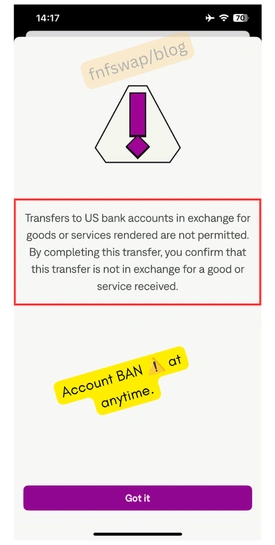
Works for PayPal-sourced funds? Yes.
Real case from my operations: With this method, the same PayPal inflow charges apply, and 3 more additional charges on Skrill.
How does it work? Get a verified Skrill account, link Africard, add a bank, withdraw from the card to bank, wait for deposits and swap for Naira – each of the steps with their accrued fees.
That is, Card linking Skrill charges, withdrawal to foreign bank charges, and converting to Naira charges.
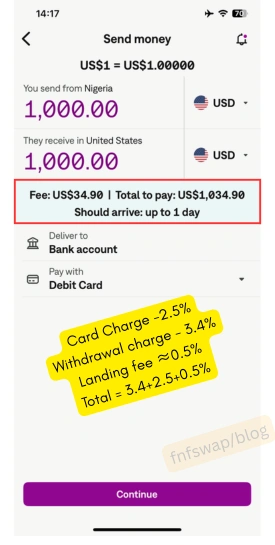
That is, you will need to look for a foreign bank to use, withdraw the funds to the bank, then swap to Naira with additional charges from USD to Naira on the 3rd party platform.
Pros:
- This method is for those who do not want to use the card-to-card method.
- Those who want to do it alone.
- Those who want to fund their Forex or betting account directly on Skrill.
Cons:
- Same PayPal inflow charge.
- You need a verified Skrill account.
- Card linking to Skrill charge.
- You need a foreign bank account.
- Withdrawal charges on Skrill.
- Skrill can limit your account, and you lose all the money.
- Up to 72 hours waiting for deposits.
- Final USD to Naira conversion cash.
- 5-15% losses as compared to using card to card.
Complete Fee Breakdown: All Costs You'll Pay
No surprises. Here is every fee you might encounter when selling or withdrawing AfriCard funds:
| Fee Type | Amount | When charged |
| Card issuance (Dollar) | $3.15 | Once, on first activation |
| Annual card convenience fee | $20 (VAT exclusive) | Annually |
| OCT inflow fee (PayPal, etc.) | 1.5% of the inflow amount | Every PayPal → AfriCard withdrawal |
| ATM withdrawal fee (international) | 0.6% of the amount | Every ATM cash withdrawal |
| Card-to-card transfer fee | None charged by UBA | When sending to another AfriCard user |
| DOM account → AfriCard transfer | None for internal transfers | When moving within UBA |
Fee example (real scenario): You have $200 in PayPal. You withdraw to your AfriCard:
• UBA OCT inflow: $200 × 1.5% = $3.00 deducted → $197 arrives on card
• You then do a card-to-card transfer to fnfSwap: no UBA fee
• fnfSwap pays you Naira at the day’s agreed rate
• Net: you sell $197 worth of AfriCard balance.
Rate note: UBA’s official branch USD/NGN rate is substantially lower than the market rate you can get through a P2P platform like fnfSwap.
Exchange Rate Guide: Where to Get the Best Naira Rate
Not all withdrawal methods give you the same Naira value for your dollars. This matters even if a ₦20/$ difference on $100 is ₦2,000.
| Method | Approximate Rate | Speed |
| UBA Branch rate | Lower – bank’s own controlled rate. | Same day (if allowed) |
| International ATM | Varies by machine/country | Instant |
| P2P Swap (fnfSwap) | Market rate – the highest available | 1–15 minutes |
Why fnfSwap typically offers a better rate: P2P platforms like fnfSwap operate at the parallel/open market rate, not the official bank rate.
The gap between UBA’s official USD rate and the open market rate means you often get significantly more Naira per dollar through a trusted P2P platform.
Important: Yes, the fnfSwap rates are dynamic – the larger your order, the better the rate.
Always contact fnfSwap to confirm the current rate before initiating a transfer, as rates change with the Naira/Dollar market.
With all fees and exchange rates known, let’s now see how to withdraw your UBA Dollar Prepaid Card funds for Naira in less than 15 minutes.
Step-by-Step: How to Sell AfriCard Dollars to Naira via fnfSwap (Fastest Method)
This is the most popular method for Nigerian freelancers, PayPal earners, and digital entrepreneurs. It works regardless of whether your funds came from PayPal, a card-to-card transfer, or a branch deposit.
What you need:
- Your UBA AfriCard (active and funded).
- Your Nigerian bank account details (for Naira payment)
- Access to the UBA Mobile App or the gtpsecurecard.com portal
Step 1: Contact fnfSwap and initiate a swap order
Reach out to fnfSwap via the website (fnfswap.com.ng).
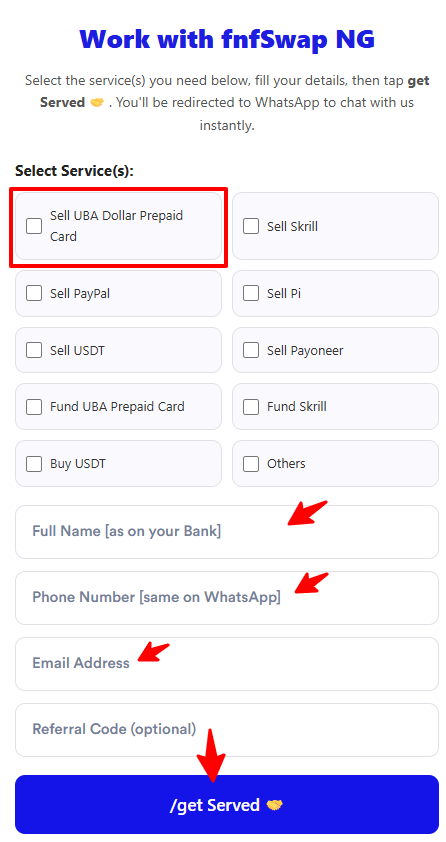
Relate how much worth of funds you want to facilitate for Naira.
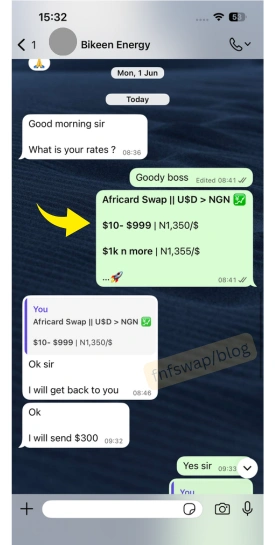
Step 2: Agree on the rate and get a transaction agreement
fnfSwap will confirm the current $/₦ rate for your order size. Larger amounts attract better rates.
Step 3: Get fnfSwap’s AfriCard Client ID and last name
Once the swap is agreed, fnfSwap will provide their AfriCard Client ID and the last name to use for the transfer.
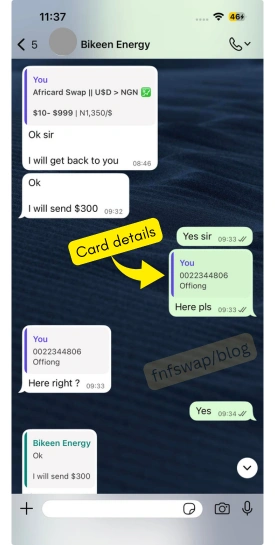
Step 4: Transfer the AfriCard dollars to fnfSwap
Via UBA Mobile App:
- Download and open the UBA App
- Add your AfriCard under “Manage Cards.”
- Go to Transfer → Card-to-Card Transfer
- Enter fnfSwap’s Client ID and last name
- Enter the agreed dollar amount
- Confirm with the OTP sent to your phone
Via the AfriCard portal:
- Log in at gtpsecurecard.com/UBA/Login
- Go to Card-to-Card Transfer
- Enter fnfSwap’s Client ID and last name
- Enter the amount and confirm with the OTP
- You will receive email confirmation of the funds sent.
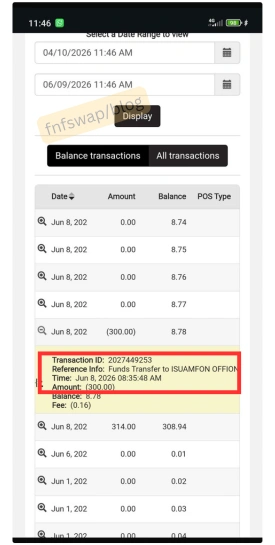
Step 5: Receive Naira in your bank account
Once fnfSwap confirms receipt of the AfriCard dollars, the Naira equivalent is sent to your Nigerian bank account – typically within 1–3 minutes and 15 minutes max [in case there is a network problem].

Service note: fnfSwap operates 7 days a week, including weekends and public holidays. If payment to your bank account is delayed by more than 15 minutes, fnfSwap offers a $2 apology credit.
Dollar Card for Naira Fast, safe & peer-assisted
FAQs
How do I sell my UBA AfriCard dollars to get Naira?
The fastest way is via a card-to-card transfer to a P2P swap platform like fnfSwap. You transfer your AfriCard balance to fnfSwap’s AfriCard account using the UBA Mobile App or the AfriCard portal (gtpsecurecard.com) and receive Naira in your bank account within 1–15 minutes.
Can I withdraw UBA AfriCard funds at the bank over the counter?
Only if your funds were deposited directly at a UBA branch (cash-loaded). If your funds came from PayPal or any other digital inflow, UBA has blocked over-the-counter withdrawal for those funds in Nigeria.
Can I withdraw AfriCard PayPal funds from a UBA ATM?
Yes. ATM withdrawals work for all AfriCard funds, including PayPal inflows. The fee is 0.6% of the transaction amount, and your daily limit is $1,500.
What is the UBA AfriCard Client ID?
The Client ID is the 10-digit number printed on the back of your AfriCard. It functions as your AfriCard account number for card-to-card transfers. It is also called “Customer ID.”
What is the best exchange rate for UBA AfriCard dollars to Naira?
P2P swap platforms like fnfSwap typically offer market rates that are higher than UBA’s official branch rate. Rates are dynamic – contact fnfSwap directly for the current rate before transferring.
How long does it take to convert AfriCard dollars to Naira?
Via fnfSwap card-to-card swap: 1–15 minutes after your transfer is confirmed. Via UBA ATM: instant (you get cash immediately). Via branch (if eligible): same day during banking hours.
What are the fees for withdrawing from UBA AfriCard?
The key fees are: OCT inflow fee of 1.5% (charged when funds arrive from PayPal), ATM withdrawal fee of 0.6%, and annual card convenience fee of $20. Card-to-card transfers between AfriCard users carry no UBA fee.
What is the daily limit for UBA AfriCard transactions?
The daily card-to-card transaction limit is $1,500. The quarterly limit is $10,000 (note: based on firsthand usage data, the $10,000 cap is applied quarterly, not monthly).
Can I transfer AfriCard funds to my UBA domiciliary account?
Only if your funds did not come from PayPal. UBA’s policy blocks DOM account transfers for PayPal OCT inflows. If your funds came from a branch deposit, the DOM transfer route is available via UBA Internet Banking.
Does UBA buy back AfriCard dollars from customers?
No. UBA does not buy back or purchase AfriCard dollar funds from customers. The only official exit routes are ATM withdrawal, card-to-card transfer, or DOM account transfer (where eligible). For Naira conversion, P2P services like fnfSwap are the recommended route.
Quick Decision Guide
Use this to find your method in under 10 seconds:
My funds came from PayPal: → Method 2 (Card-to-Card via fnfSwap) ✅ – fastest and best rate → Method 1 (ATM) ✅ – if you are abroad and you need physical cash.
My funds came from a branch deposit: → Method 4 (Branch counter) ✅ – if you want cash over the counter → Method 3 (DOM account transfer) ✅ – if you’re a UBA customer with a DOM account → Method 2 (fnfSwap) ✅ – if you want the best Naira rate.
I’m outside Nigeria: → Method 1 (International ATM) ✅ – Visa ATMs worldwide work
I need Naira in my account TODAY: → Method 2 (fnfSwap) ✅ – 1-15 minutes, 7 days a week, including weekends